
Submittals
Submittal Review Built for Multi-Site Rollouts
A submittal is the gate between an approved drawing and a purchase order, so a review that stalls holds up fabrication and pushes the opening date out with it. On a rollout the same prototype package comes back for review at every store, and much of that review sits with the retailer's own brand and design team alongside the general contractor. RolloutIQ™ runs submittals as routed review on the project itself, so the right people can work in parallel and the approved package stays intact through every round.
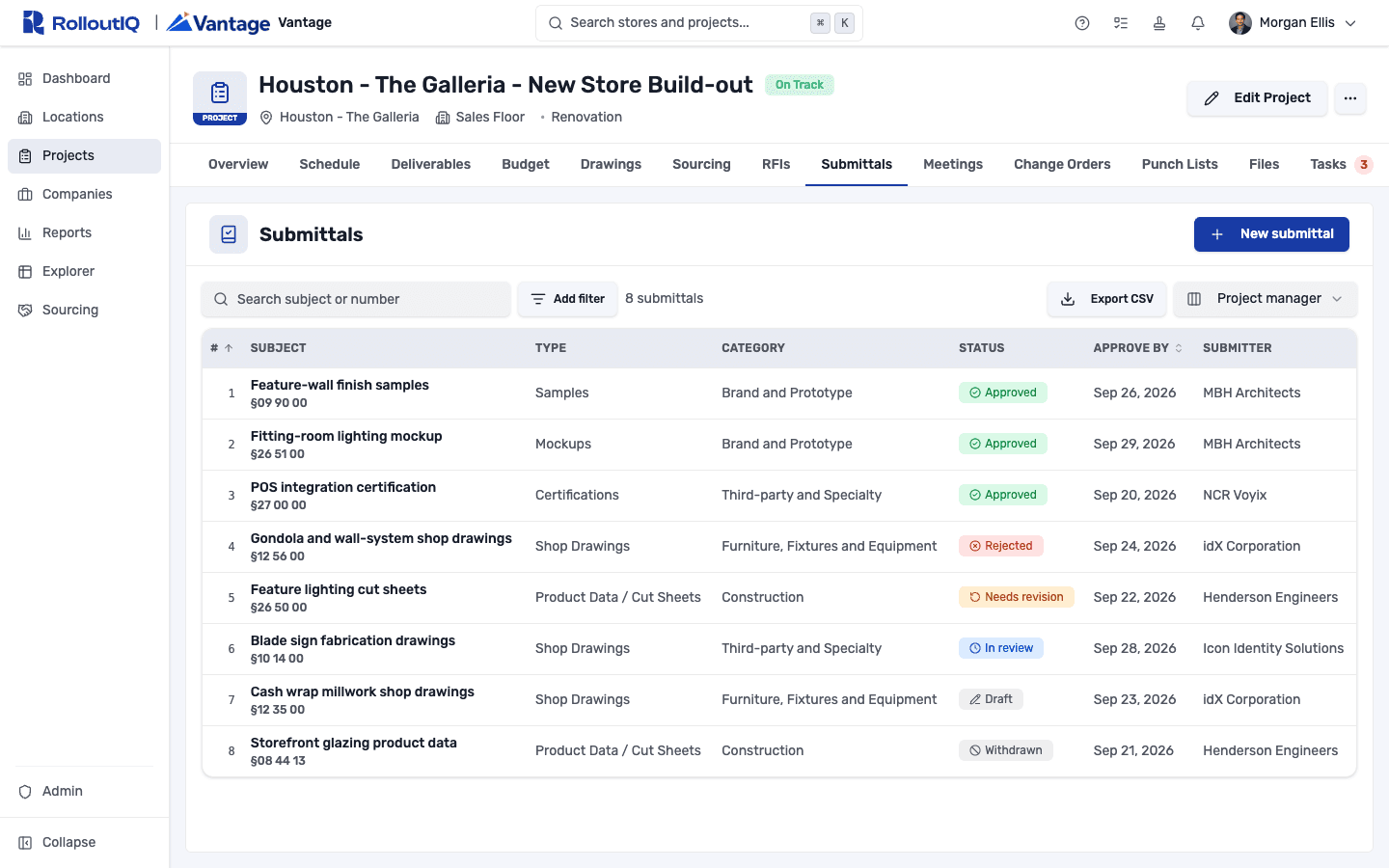
The Problem
Why Submittal Review Breaks at Scale
Approvals gate fabrication and installation, so a package that drifts into an inbox or waits on one reviewer at a time quietly moves an open date. On a rollout the same review repeats at every store, which turns a small inefficiency into a program-wide one.
Email Review Hides the Approved Set
Packages tracked in email and shared folders drift out of order. Three versions of the same shop drawing float around, and months later no one can point to the one that carried the approval that let fabrication start.
Serial Review Eats the Runway
When each reviewer waits for the one before, a package that needs a brand sign-off and an engineer's check takes weeks it did not need to. On a store with a fixed open date, those weeks come out of the schedule, and the delay lands on the long-lead order the submittal was supposed to release.
The Brand Team Sits Inside the Review
In a retail program the retailer's own prototype and brand managers review the package, next to the architect and the specialty consultants. Routing has to reach people who never appear on a general contractor's org chart, while still holding each vendor to only its own work.
What RolloutIQ™ Does
What RolloutIQ™ Does
RolloutIQ™ runs every submittal as a routed record on its project, with review lanes that resolve to the right people, a decision from each reviewer, revision rounds that keep the history, and an approved package that cannot be quietly changed.
Routing That Resolves to the Right People
Role-based routing chains decide who reviews a package and in what order, and they resolve to the actual people assigned to each project automatically. Run steps in parallel so brand, design, and technical reviewers work at the same time, or in sequence when one decision depends on another. Override the chain by type, or adjust it on a single submittal.
A Decision From Every Reviewer
Each reviewer records Approved as Submitted, Approved with Comments, Needs revision, or Rejected, and a rejection asks for a reason. The round closes on the combined outcome, where a single Needs revision or Rejected sends the whole package back. A coordinator can skip a reviewer who has gone quiet or force-close a round that has stalled.
Revision Rounds That Keep the History
When a package comes back, Request resubmit opens a new round with the prior reviewers and the history intact. Every reviewer's decision and the reason behind it carries forward, for as many rounds as it takes to reach approval.
A Runway Warning Before the Date Slips
Set an approve-by date, or let it fall back to your workspace default review window. When review needs more time than the date leaves, a warning surfaces it while there is still room to expedite, with the install date and lead times shown as planning context.
The Approved Package Stays Intact
Once review starts, the sent package freezes, so an approval always names the exact documents that were approved. You can still add a file a reviewer asks for mid-review, and a decided submittal closes to further edits and comments so the record cannot be reworked after the fact.
A Full Record, and an Export
A change-history view records who changed what and when, including every review event. Your home dashboard splits open submittals into what needs your action and what is waiting on others, and the Excel export carries whatever filters are on screen. It reads in all nine supported languages, the exported log included.
Highlights
Inside a Submittal
The whole review lives on one record, from the routing chain to each decision, the files under review, and the dates the package is working against.
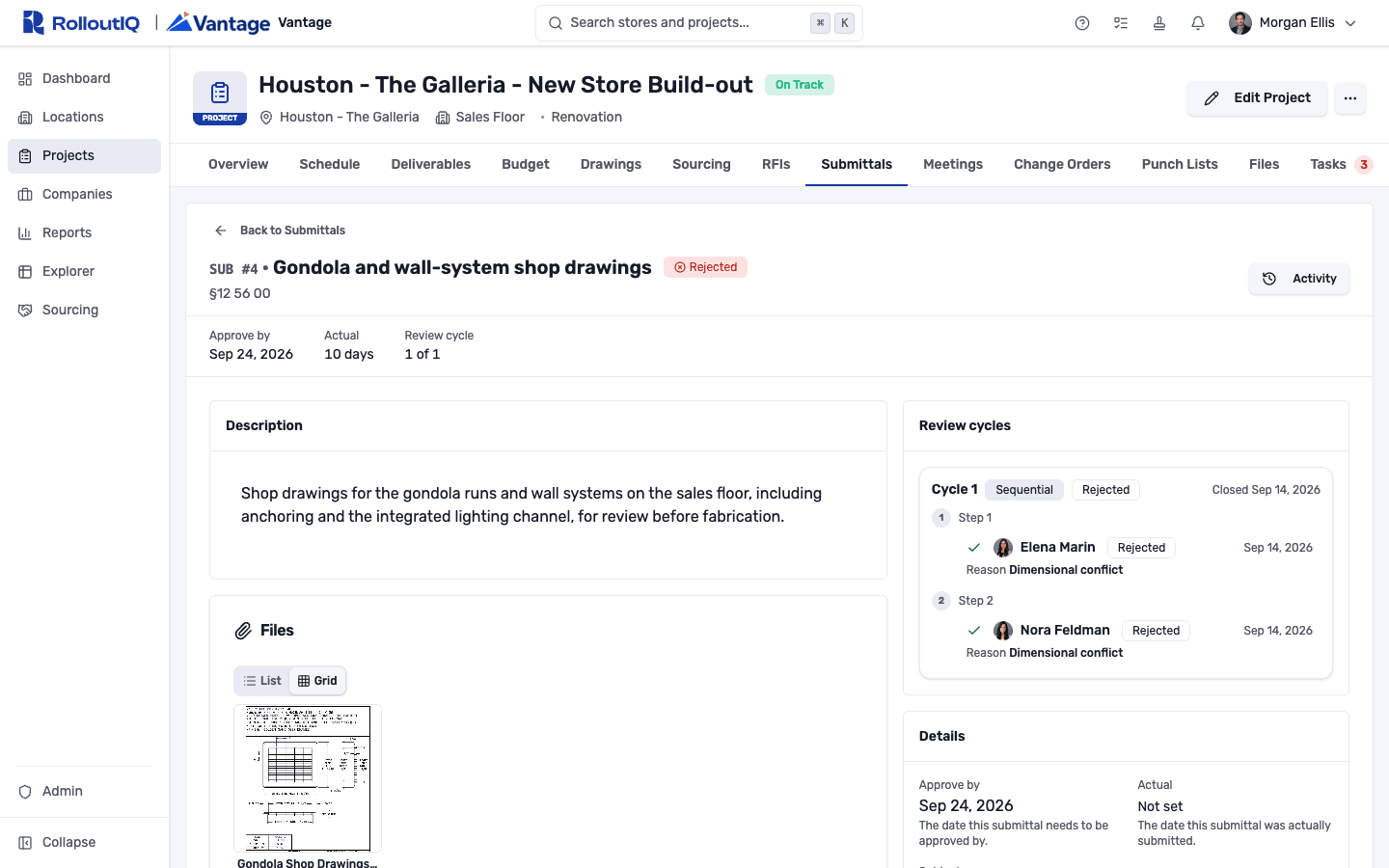
Every decision, with the reason
Open a submittal to see each reviewer's decision in order, the reason behind any rejection, the files under review, and the approve-by date it is working toward, including where a rejected round stopped.
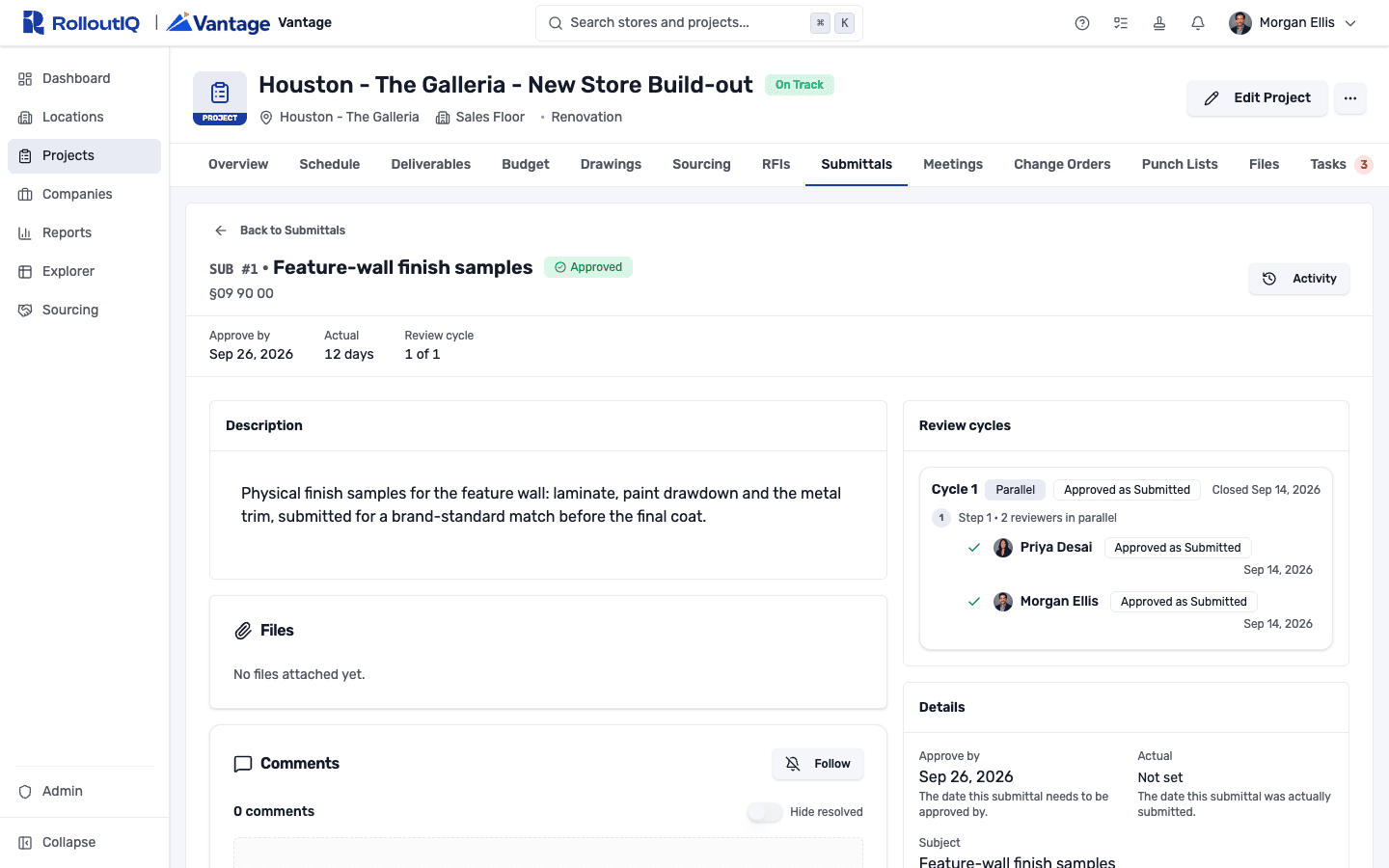
Reviewers working in parallel
A parallel step puts two or more reviewers on the package at once, so a brand approval and a technical approval land at the same time. The cycle closes as soon as the last decision is in.
In the mobile app
Review cycles you can read on site
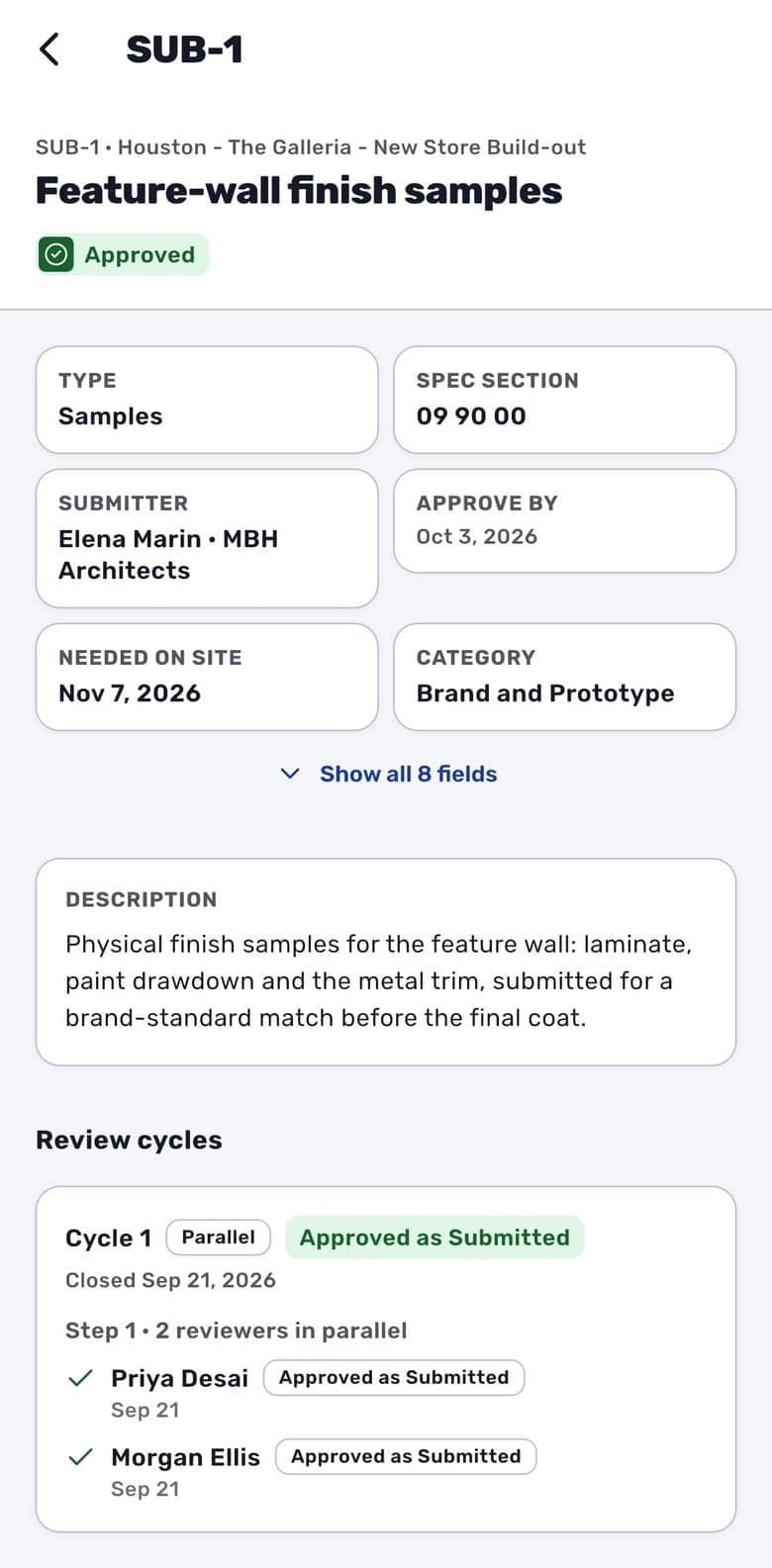
The submittal register in the app counts down the days to each approve-by date. Inside a submittal, every review cycle, step and reviewer is there, with each decision and note.
- Search, sort and quick views by status, type, category and submitter
- Overdue approve-by dates flagged on the row
- Attached documents and photos open in the app
- Comment with @mentions on the activity timeline
Creating a submittal, sending it for review and recording a decision happen on the web.


In Practice
How Multisite Teams Use It
Protect the Open Date
Review in parallel and watch the runway so a submittal is less likely to be the reason a store opens late. When the approve-by date is at risk, you hear about it early enough to expedite the review or the long-lead order behind it. Before the material goes in, the review cycles and each reviewer's decision are on the field lead's phone in the RolloutIQ app.
Run Brand and Technical Review Together
A retail package needs a brand-standard match and an engineer's sign-off. Route both on the same submittal, each as its own reviewer, so the prototype team and the technical reviewers decide on one record instead of trading email threads.
Let Vendors Submit Without Oversharing
The fixture vendor and the general contractor submit on the projects they are scoped to and see only their own submittals, plus any they are a reviewer on. Their attachments appear in the project Files tab alongside everything else, still bounded by what each company is allowed to see.
Approve Against a Record That Holds Up
Because the package freezes and every decision is retained, an approval points at the exact documents and the people who signed off. If a fabrication dispute surfaces later, the round-by-round history shows what was approved and who decided it.
For franchise groups
The franchisor's design reviewer in the chain
Route a finish or fixture package to your architect and the franchisor's design reviewer at the same time. An outside reviewer with an account sees only the submittals they are asked to review.
See RolloutIQ for franchise groupsFAQ
Submittals FAQ
Submittal software gives shop drawings, product data, samples, mockups, and certifications a routed review workflow instead of email threads and spreadsheets. RolloutIQ™ routes each package to the right reviewers, tracks it through revision rounds, and freezes the approved set so an approval names the exact documents that were approved.
Role-based routing chains decide who reviews a package and in what order. A parallel step puts several reviewers on it at once; a sequential step advances the moment each reviewer decides. You can override the chain by submittal type or adjust it on a single package.
Yes. Outside collaborators submit on the projects they are scoped to and see only their own company's submittals, plus any they are a reviewer on. Everyone in a review chain is a platform user, so the record shows exactly who was sent what and when.
Every reviewer's decision is retained through each revision round, the sent package freezes once review starts, and a decided submittal closes to further edits. A change-history view records every review event, and you can export the list to Excel at any time.
Ready to Take Submittals Off Email?
See how RolloutIQ™ runs shop drawings, product data, samples, and certifications as routed review that protects your open dates. Book a demo with our team.