
RolloutIQ™ vs Smartsheet
The Retail Model Smartsheet Asks You to Build Yourself
Smartsheet is a powerful, secure work platform, and for many retail teams it is the incumbent they graduate from. It markets a store-opening solution, with MOD Pizza, Arc'teryx, and PVH among its retail customers. Smartsheet ships templates and a grid, so the retail model is something your team builds and maintains. RolloutIQ™ starts with that model already built.
Keep scheduling in Smartsheet and still adopt RolloutIQ. The integration mirrors your Smartsheet schedule into RolloutIQ read-only, so the rest of the platform runs off the same dates without a full switch.
See the Smartsheet integrationThe Challenge
Where Smartsheet Slows Down a Growing Rollout Program
Smartsheet is genuinely good at status tracking, schedules, dashboards, and approvals, which is exactly why it is entrenched. Where it strains is fit for purpose at scale, once a hand-built configuration starts to cost more than it saves.
A Retail Model You Build Yourself
Smartsheet has no native Location, Space, Project model and no store lifecycle. Partners sell store-rollout solutions built on it, and otherwise your domain model gets invented column by column, then maintained by whoever built it. RolloutIQ™ ships locations, spaces, and projects as its data model.
Cost Numbers Are Spreadsheet Math
Smartsheet's own buyer's guide says it includes schedule baselines and budget templates, but "does not have fully built-in budget baselines, automated earned value tools, or native resource cost views", and that users build those with linked sheets and formulas. RolloutIQ™ provides a budget baseline locked by approval and changed only through routed, versioned revisions.
Portfolio Rollups Break on Reorg
Control Center rollups depend on rigid blueprint and column discipline. Smartsheet's own docs warn that changing column names after connecting Resource Management can break your deployment.
The System of Record Lives in One Person's Head
Control Center's Primary Lead has to transfer ownership before being deprovisioned: once that account is deactivated, Smartsheet Support cannot move the items. The configuration, and the continuity of the whole tracker, concentrates in the person who built it.
Comparison
Feature Comparison: RolloutIQ™ vs Smartsheet
See how a purpose-built retail rollout platform compares to a configurable work platform for store development at scale.
Retail-native Location, Space, Project model
RolloutIQ™
Smartsheet
Real estate kept separate from the construction project
RolloutIQ™
Smartsheet
Governed budget baseline with approval routing
RolloutIQ™
Smartsheet
RFI workflow depth
RolloutIQ™
Smartsheet
Per-sheet drawing identity & versioning
RolloutIQ™
Smartsheet
Multi-site portfolio dashboard
RolloutIQ™
Smartsheet
Brand as a portfolio field with brand-scoped approvals
RolloutIQ™
Smartsheet
Standardization enforced across the portfolio
RolloutIQ™
Smartsheet
MCP server for your own AI assistant
RolloutIQ™
Smartsheet
Tenant-isolated database architecture
RolloutIQ™
Smartsheet
What this page says about Smartsheet was last checked against its public materials in September 2026. Products change, so check with Smartsheet for its current capabilities.
See sourcesHide sources
- Smartsheet, Retail solutions (2026)
- Smartsheet, Top construction budgeting software (2026)
- Smartsheet Help, Use Resource Management with Control Center
- Smartsheet Help, Control Center Primary Lead
- Smartsheet, MCP Server now generally available (March 2026)
See It in Action
What RolloutIQ™ Brings to the Table
Real screens from RolloutIQ™, not a feature list. The capabilities that set it apart from Smartsheet for multi-site retail rollouts.
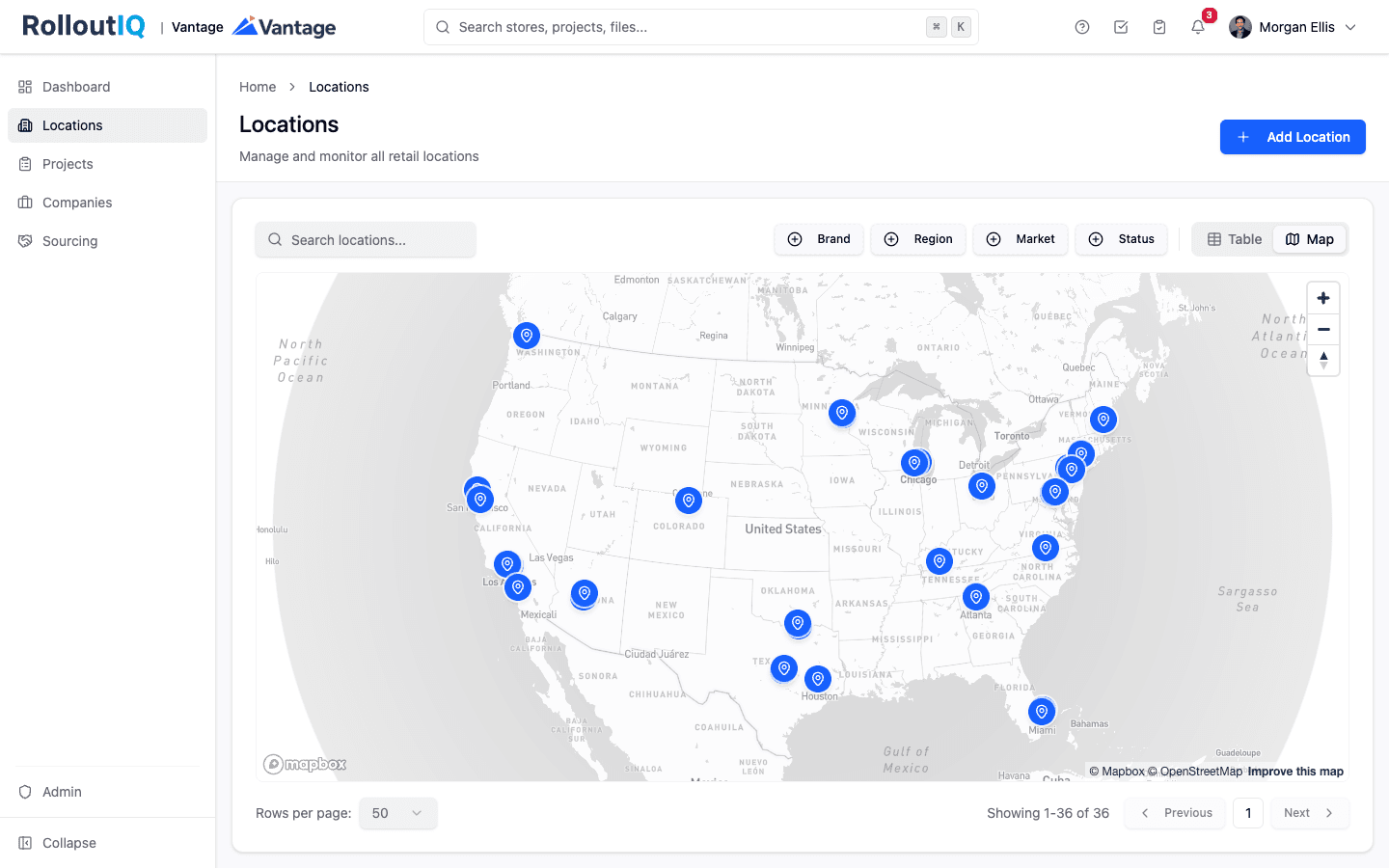
See Every Store in One Place
Every location and its projects on one portfolio view instead of 30 browser tabs: which stores are still in planning and which are slipping against a Q3 open.
- Portfolio map and list across every location
- Portfolio list filtered by brand, region, or market
- Drill from the portfolio into any single store
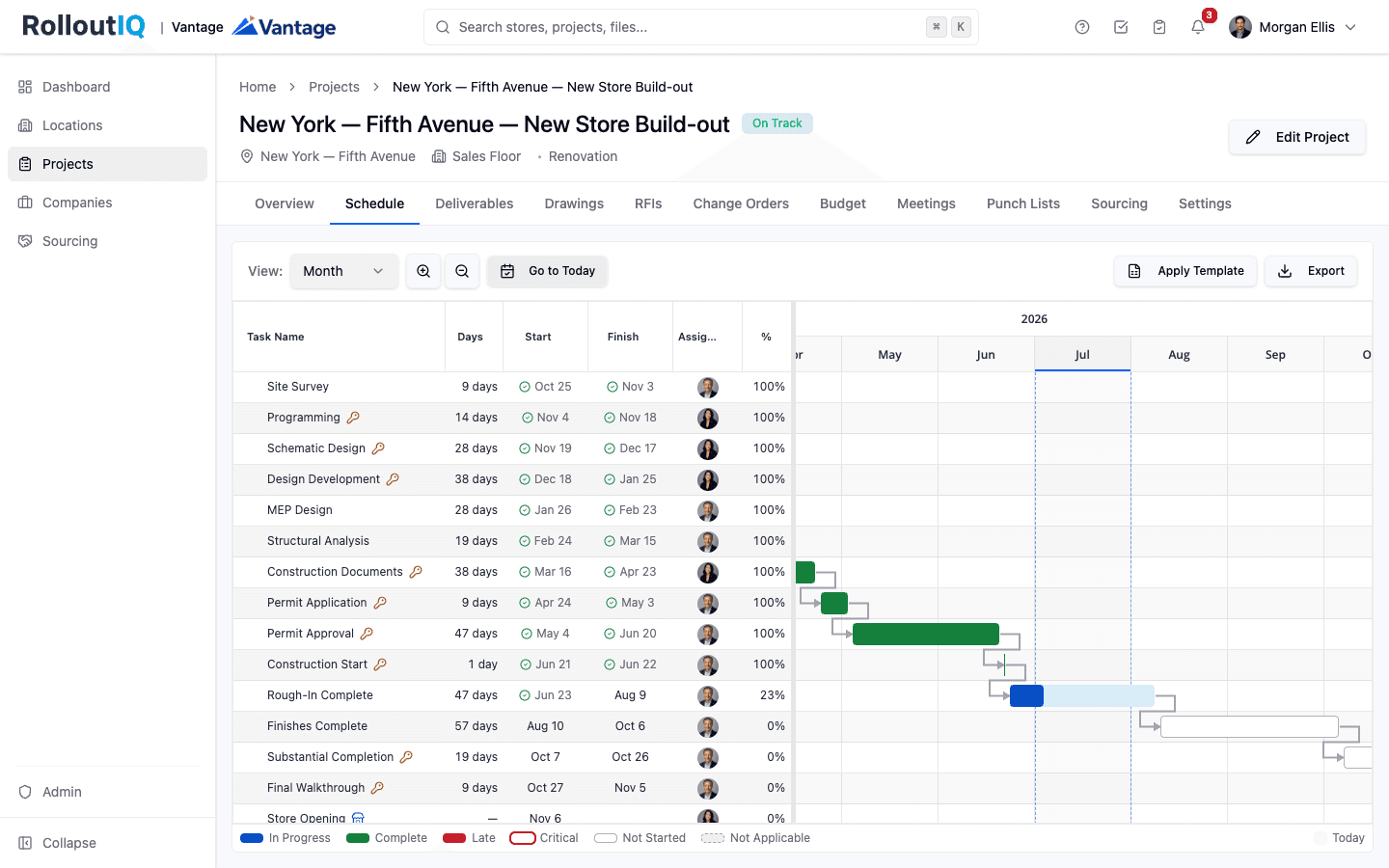
A Schedule That Recalculates When Reality Changes
A real critical-path schedule with dependency math. Move one deliverable and RolloutIQ™ ripples the change through the timeline, so the new opening date shows up the moment you save.
- Critical-path dependencies with lag
- Ripple recalculation, with a preview of critical dates that move
- Phase and deliverable milestones per project
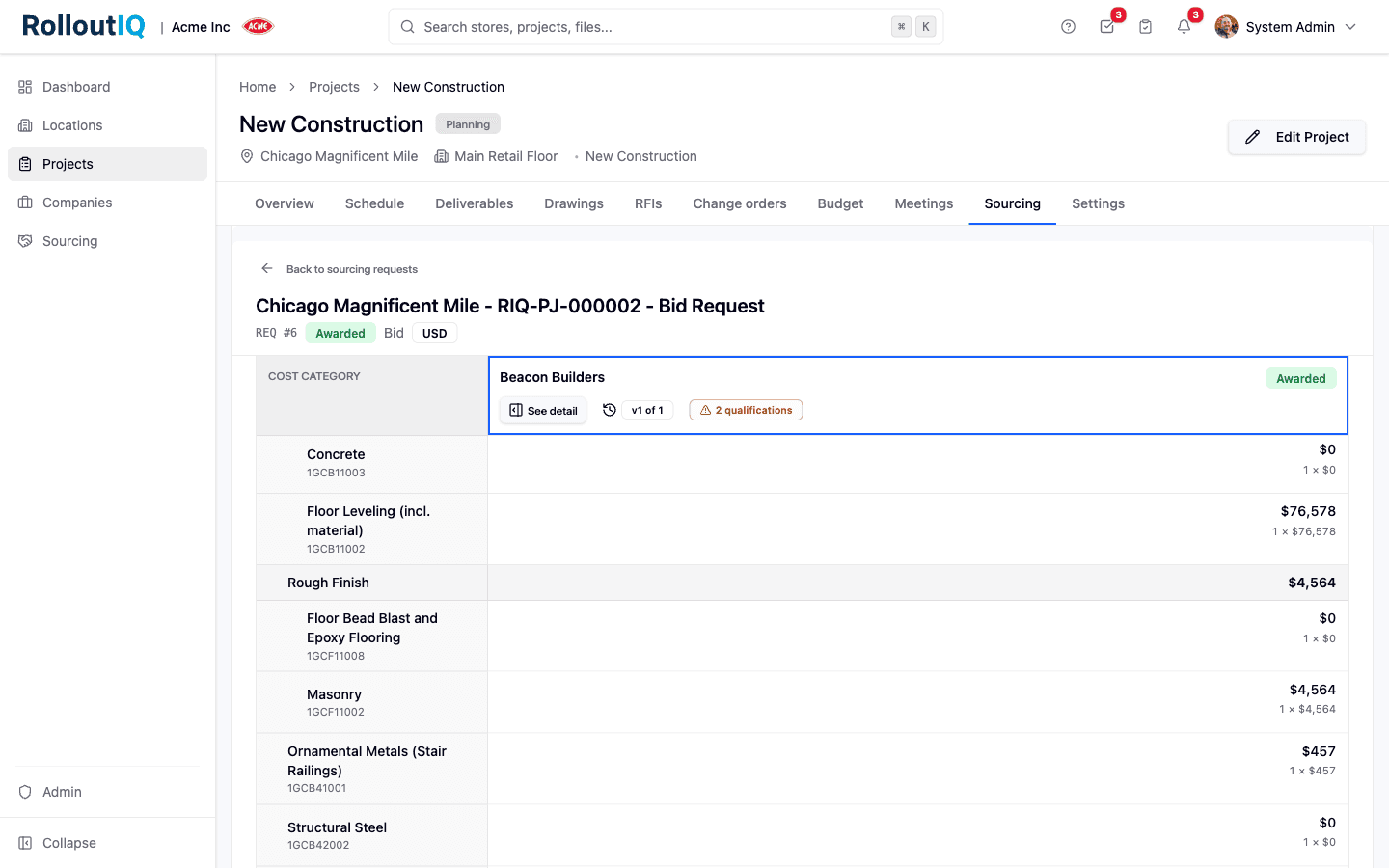
Compare Every Bid Side by Side
Send one pricing form to every bidder, then line their numbers up in a leveling matrix against the same cost categories. Award with a governed decision that flows straight into the budget.
- Sealed competitive bidding
- Side-by-side leveling matrix
- Awards feed the project budget
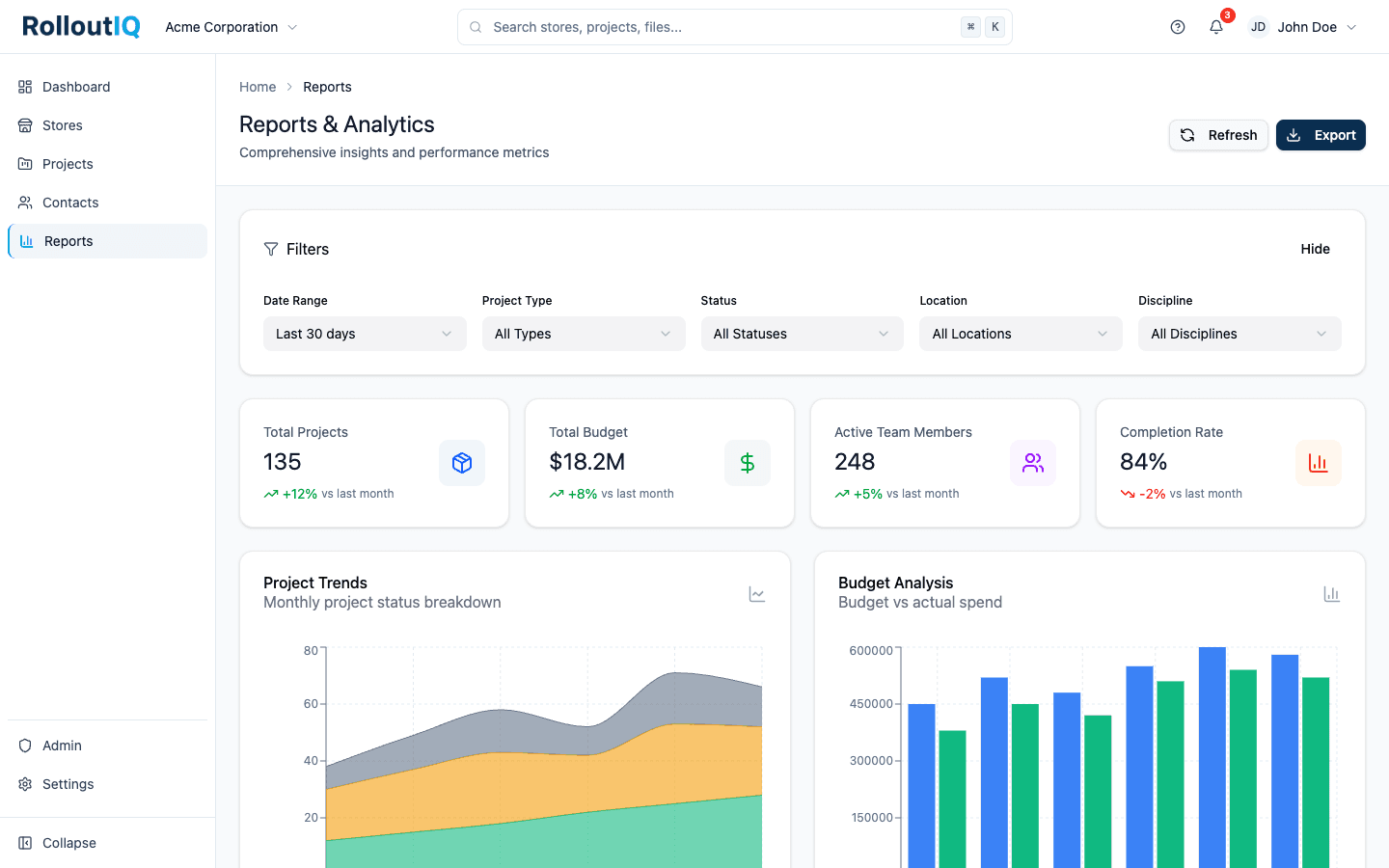
Portfolio Reporting Built for Leadership
Four tabs of portfolio reports, led by a hotlist that ranks the At Risk and Off Track projects with the reason for each. Any section exports to Excel and any tab to a board-ready PDF.
- Re-targeted openings and the reasons behind them
- A schedule risk hotlist of the stores in trouble
- Daily trend capture across every store
Use Cases
Why Retail Teams Graduate from Smartsheet
The Retail Model, Pre-Built
Locations, spaces, projects, a vendor directory, and reusable schedule templates are part of the product. Your team stops maintaining a hand-built grid and runs the program on a retail system of record.
A Budget That Survives an Audit
Each project's budget is locked by approval and changed only through routed, versioned revisions, recorded in a read-only audit log, so there is one version of each budget.
Portfolio Rollups That Hold Up
Schedule risk rolls up across every store from a structured model, so renaming a column or reorganizing a region leaves the portfolio view intact.
FAQ
RolloutIQ™ vs Smartsheet: common questions
No. The Smartsheet integration mirrors a project's schedule from Smartsheet into RolloutIQ read-only, on a recurring sync, so teams that run their schedule in Smartsheet never re-key it while the rest of RolloutIQ runs off the same dates.
Smartsheet's MCP server has been generally available since March 24, 2026, on Business, Enterprise, and Advanced Work Management plans. RolloutIQ's server reads a store model with schedules, budgets, RFIs, and punch lists, where Smartsheet's reads the sheets your team built.
In Control Center, the Primary Lead has to transfer ownership before their account is deactivated, because Smartsheet Support cannot transfer the items afterward. In RolloutIQ, a deactivated user's role-based work moves automatically to the next active person in that role.
Outgrowing Your Smartsheet Tracker?
If project volume is rising and the person who built the sheet is a single point of failure, see what a retail-native system of record looks like.