
RolloutIQ™ vs Spreadsheets
The Tracker You Built Over a Weekend, Outgrown
Excel and Google Sheets are the true baseline that retail teams graduate from, and tools like Airtable, Quickbase, and Monday sit a tier above them. The spreadsheet works until project volume rises, the rollup breaks on a reorg, and the person who built it leaves. RolloutIQ™ ships the retail model and workflows the spreadsheet asks you to invent yourself.
The Challenge
Where the Spreadsheet Breaks Down at Rollout Scale
A spreadsheet is genuinely fine for a handful of stores and a single coordinator who owns the whole picture. The trouble starts at scale, where every added store makes the sheet harder to keep correct.
An Empty Grid
A spreadsheet has no Location, Space, Project model and no store lifecycle. Every store, vendor, and milestone is whatever a cell happens to contain. RolloutIQ™ ships the retail data model, so structure holds as the program grows.
RFI Tracking Turns Into a Job
Spreadsheets work for one project with a handful of RFIs. With several stores open and dozens of RFIs in flight, version control and reminders become someone's full-time job. RolloutIQ™ runs RFIs as structured workflows with assignees, official answers, and audit history.
Formulas That Fail on a Rename
A portfolio rollup assembled by hand depends on consistent tabs, columns, and links. Reorganize a region or rename a field and the formulas break. RolloutIQ™ rolls up schedule risk from a structured model that does not depend on one person's formatting discipline.
Numbers Nobody Fully Trusts
Raymond Panko's research at the University of Hawaii found that about 88% of audited spreadsheets contain errors. Separately, a Quickbase survey of 1,000 US workers found close to 70% spend upwards of 20 hours a week chasing information across different tools. A governed budget and a read-only audit log give the program one set of numbers, with a history behind every change.
Comparison
Feature Comparison: RolloutIQ™ vs Spreadsheets
See how a retail system of record compares to the Excel or Google Sheets tracker that most rollout programs start on.
Retail-native Location, Space, Project model
RolloutIQ™
Spreadsheets
Store lifecycle status on every location
RolloutIQ™
Spreadsheets
Governed budget baseline with approval routing
RolloutIQ™
Spreadsheets
Change orders across every vendor stream
RolloutIQ™
Spreadsheets
Structured RFI workflow
RolloutIQ™
Spreadsheets
Construction schedule with CPM dependencies
RolloutIQ™
Spreadsheets
Per-sheet drawing identity & versioning
RolloutIQ™
Spreadsheets
Multi-site portfolio dashboard
RolloutIQ™
Spreadsheets
Brand as a portfolio field with brand-scoped approvals
RolloutIQ™
Spreadsheets
Read-only audit log
RolloutIQ™
Spreadsheets
MCP server for your own AI assistant
RolloutIQ™
Spreadsheets
Native app for the site walk, with punch pins on the floor plan and the drawing set
RolloutIQ™
Spreadsheets
What this page says about Spreadsheets was last checked against its public materials in September 2026. Products change, so check with Spreadsheets for its current capabilities.
See sourcesHide sources
- Raymond R. Panko, Spreadsheet Research (University of Hawaii)
- Quickbase, 70% of workers lose 20 hours a week to fragmented systems (June 2023)
See It in Action
What RolloutIQ™ Brings to the Table
Real screens from RolloutIQ™, not a feature list. The capabilities that set it apart from Spreadsheets for multi-site retail rollouts.
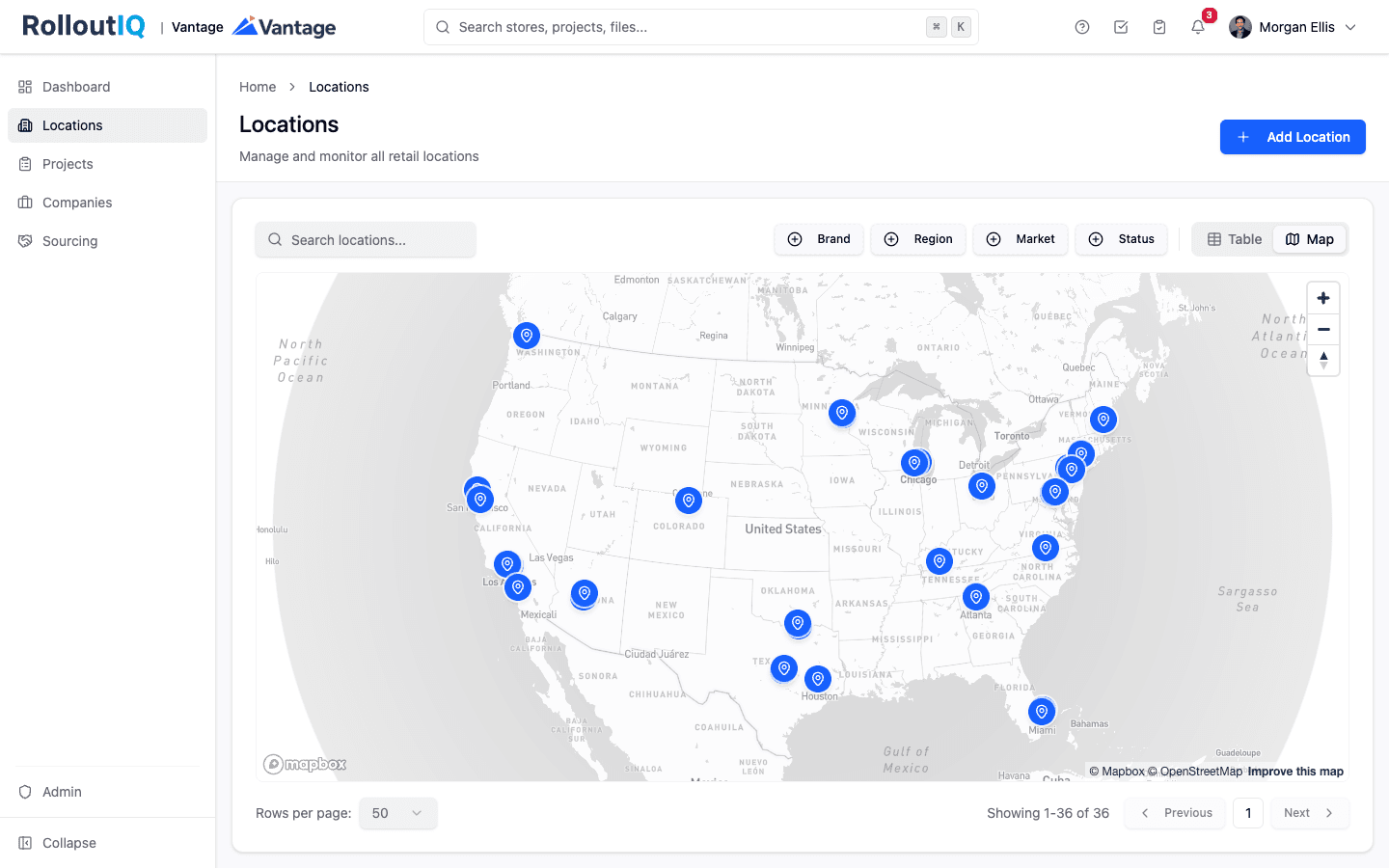
See Every Store in One Place
Every location and its projects on one portfolio view instead of 30 browser tabs: which stores are still in planning and which are slipping against a Q3 open.
- Portfolio map and list across every location
- Portfolio list filtered by brand, region, or market
- Drill from the portfolio into any single store
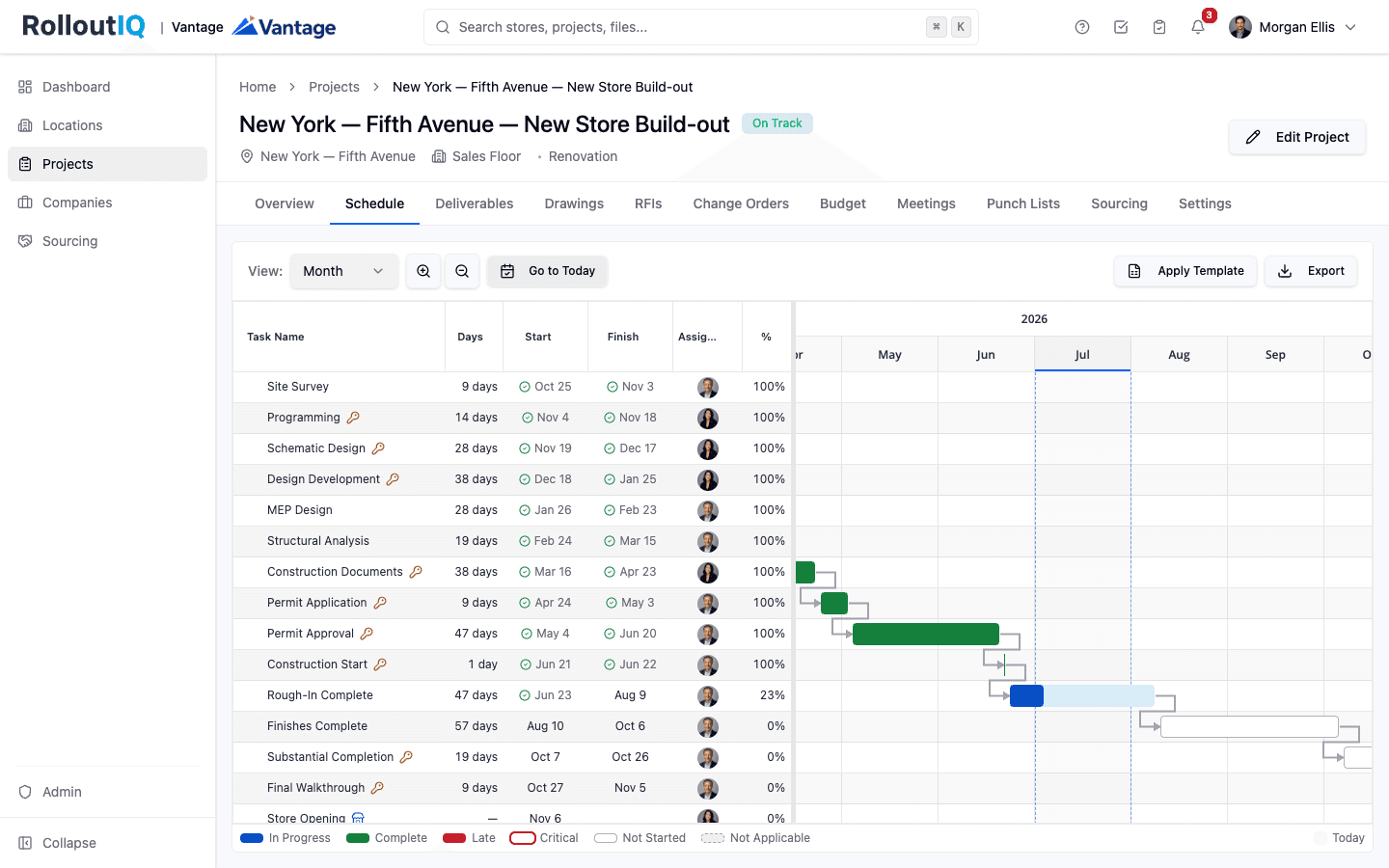
A Schedule That Recalculates When Reality Changes
A real critical-path schedule with dependency math. Move one deliverable and RolloutIQ™ ripples the change through the timeline, so the new opening date shows up the moment you save.
- Critical-path dependencies with lag
- Ripple recalculation, with a preview of critical dates that move
- Phase and deliverable milestones per project
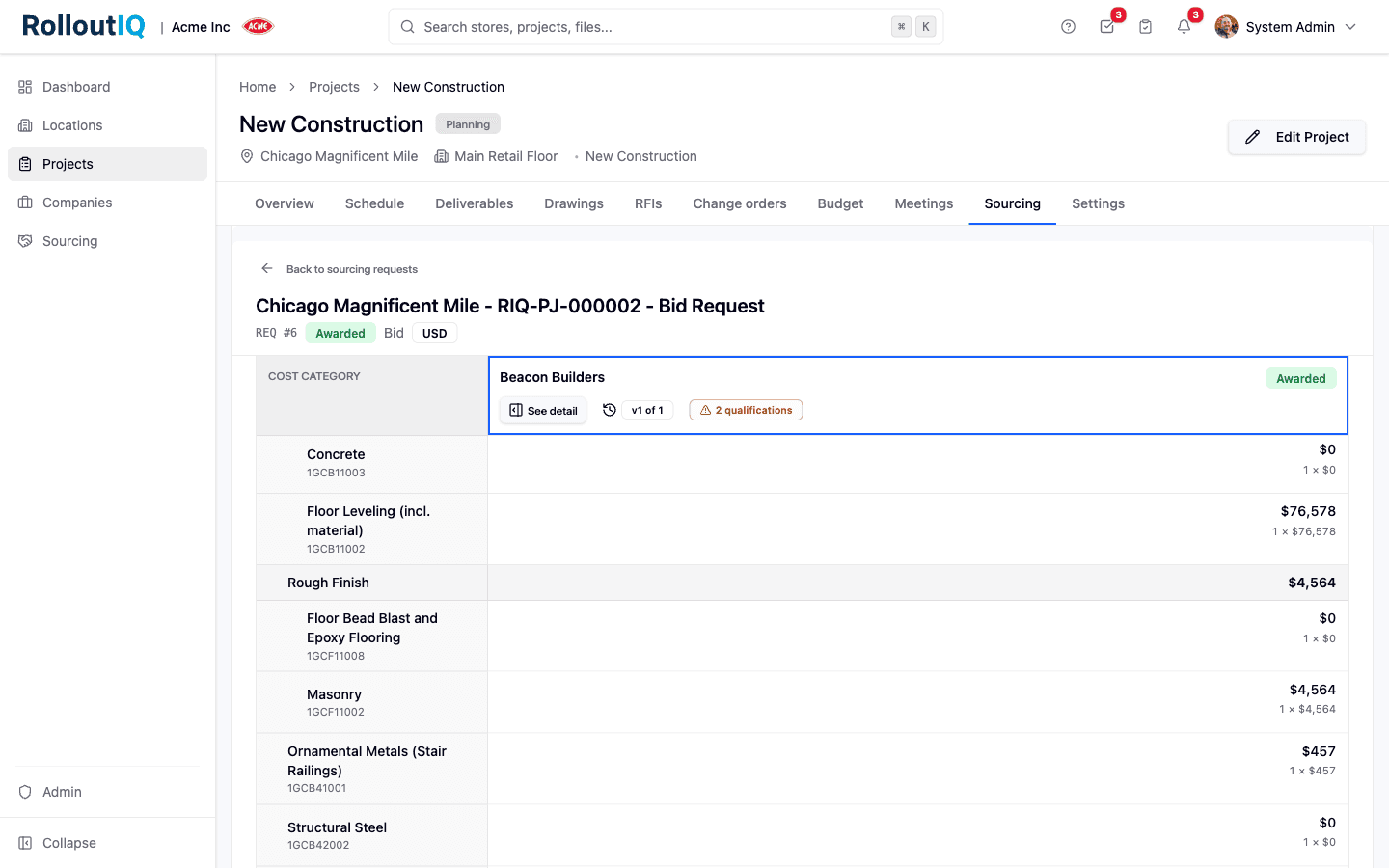
Compare Every Bid Side by Side
Send one pricing form to every bidder, then line their numbers up in a leveling matrix against the same cost categories. Award with a governed decision that flows straight into the budget.
- Sealed competitive bidding
- Side-by-side leveling matrix
- Awards feed the project budget
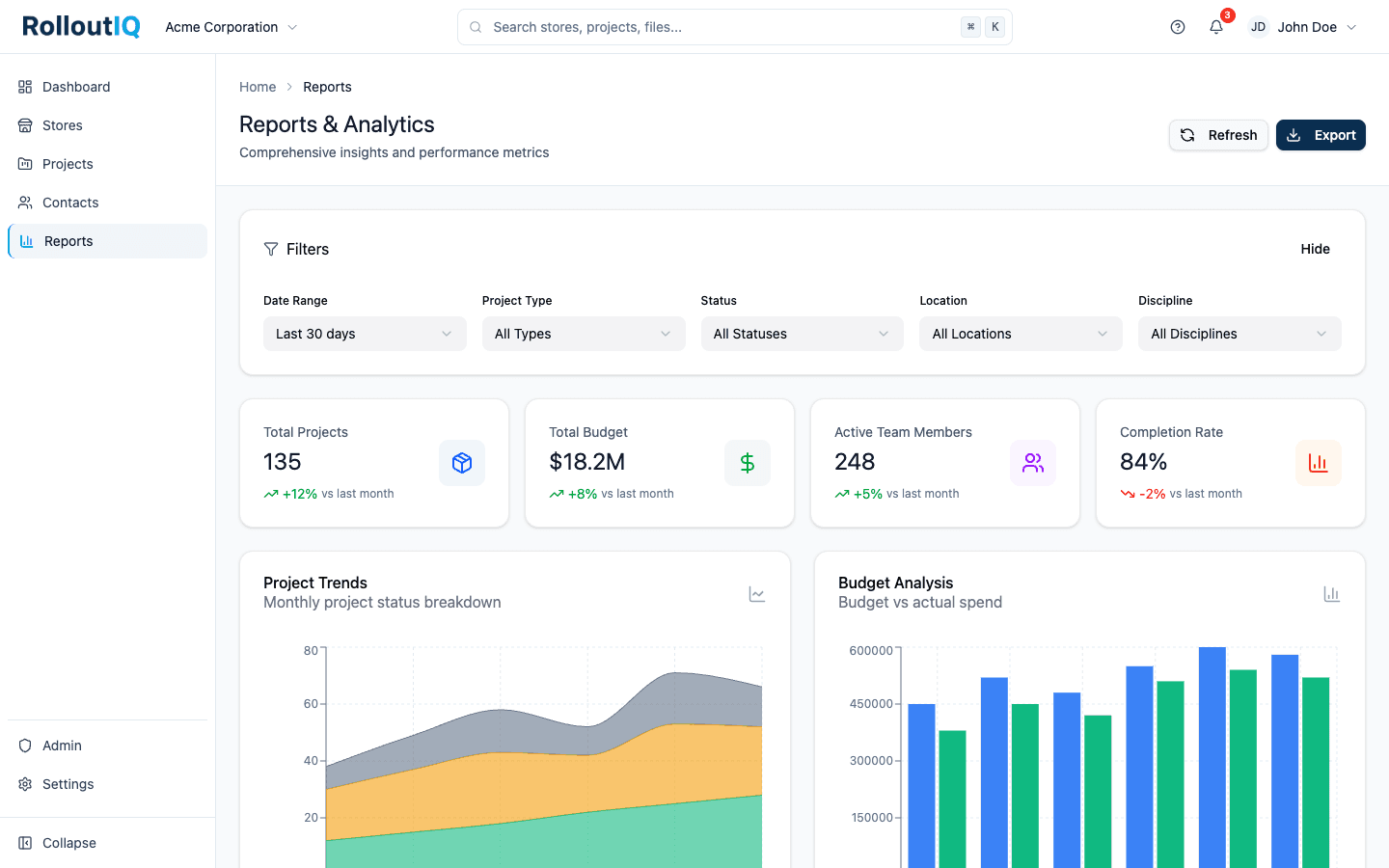
Portfolio Reporting Built for Leadership
Four tabs of portfolio reports, led by a hotlist that ranks the At Risk and Off Track projects with the reason for each. Any section exports to Excel and any tab to a board-ready PDF.
- Re-targeted openings and the reasons behind them
- A schedule risk hotlist of the stores in trouble
- Daily trend capture across every store
Use Cases
Why Retail Teams Graduate from Spreadsheets
The Retail Model, Already Built
Locations, spaces, projects, a vendor directory, RFIs, and the construction schedule are part of the product, so no one keeps a homemade tracker alive on the side.
Rollups That Survive Growth
Schedule risk is computed from structured records, so adding stores or redrawing a region changes nothing about how the portfolio view is built.
A Source of Truth That Stays Put
A governed budget baseline and a read-only audit log keep the system of record out of one person's spreadsheet, so a departure does not stall the program.
FAQ
RolloutIQ™ vs Spreadsheets: common questions
RolloutIQ's team loads your store list during onboarding, from the spreadsheet you already keep. Your store list comes first, then the milestone dates your schedule templates will carry.
Yes. Portfolio Explorer exports to Excel, Reports export to Excel and PDF, and schedules export as PDF, Excel, or an image, so the spreadsheet can stay a read-only output during the transition.
For a handful of stores and one coordinator, a spreadsheet can be enough. RolloutIQ earns its setup, which includes building your schedule templates and cost categories, once several stores are in flight at the same time.
Outgrowing the Spreadsheet?
When the tracker lives in one person's head and every reorg breaks it, see how RolloutIQ™ keeps the portfolio view standing after its builder moves on.