
Drawings
Architectural Drawings Treated as the Structured Object They Are
A retail construction project's drawing set is the spine of every downstream workflow. Upload the architect's multi-page PDF and the platform splits it into per-sheet identity, reads each title block, and publishes a clean, searchable library that every team member can preview, compare against prior issuances, and pin work to.
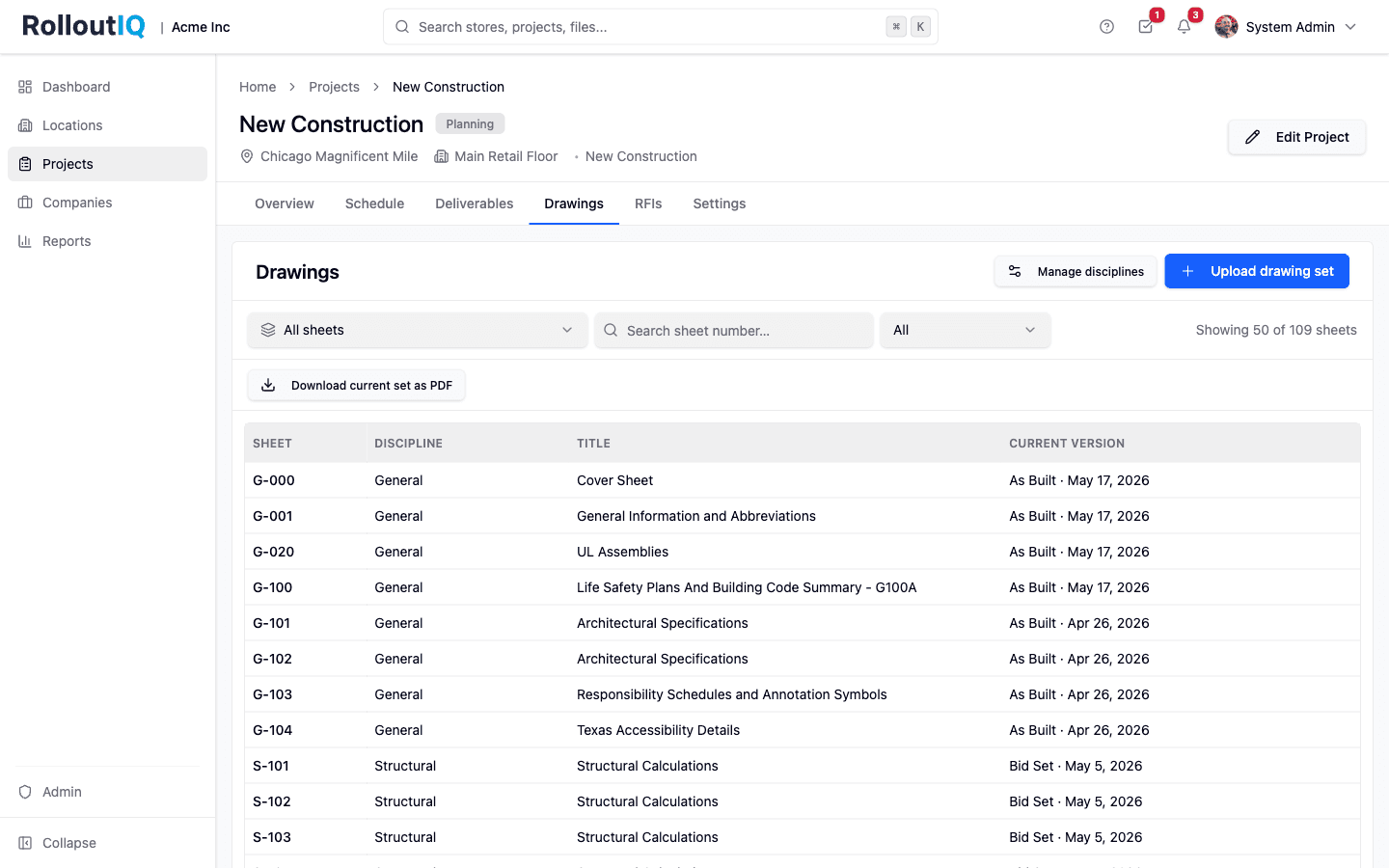
Inside a project: the Drawings tab lists every published sheet in NCS order with the current version inline.
The Problem
Why Generic Tools Lose Drawing Sets
Most retail construction teams manage drawings in a hand-built folder structure on a shared drive. Sheets get re-issued, file names drift, and the question 'is this the current A-301?' wastes hours every week.
Per-Sheet Identity Is Lost in Files
A drawing set is a versioned graph of sheets, not a single PDF. Generic file tools store the PDF; the per-sheet identity, revision history, and supersession logic do not exist.
Version Confusion Reaches the Field
When versioning is filename-based, wrong-version drawings on job sites are inevitable. Rework, rejected inspections, and brand-standard violations follow.
Re-Issuances Lose Downstream Pins
When a new set issues, downstream work that pointed at the old sheet (an RFI, a punch pin, a submittal) loses its target. Cross-referencing breaks every time the architect re-issues.
What RolloutIQ™ Does
What Drawing Management Should Do
RolloutIQ™ treats each sheet as a durable identity that survives across issuances, with automation handling the splitting, reading, and supersession work.
Multi-Page PDF Upload with Auto Split
One upload, every page handled. Background processing splits the PDF into individual sheet PDFs that can be previewed and shared on their own.
Title-Block Calibration + OCR Read
Drag a rectangle on a sample page to mark the title block; the platform reads sheet number, discipline, and title from every page against that region. A review table lets you confirm or correct before publish.
Automatic Supersession on Re-Issuance
Re-issued sheets replace prior versions on publish, matched by sheet number. Untouched sheets stay at their previous version. The current set is always one click away.
Per-Sheet Version History
Every sheet keeps its full revision history independent of which set it shipped in. Field teams see the current version with prior issuances one click away.
NCS Discipline Ordering
Drawing lists and the compiled set render in National CAD Standard sort order. Tenant admins can extend the discipline catalog with custom codes (signage, AV, security).
Compile Current State on Demand
One click produces a single PDF assembling the current version of every tagged sheet in NCS order. Ideal for permit submissions, inspector handoffs, and field reference.
Highlights
What it looks like in the product
Per-sheet identity, persistent across issuances. Open any sheet to see its inline preview and the version history that survives every re-issuance.
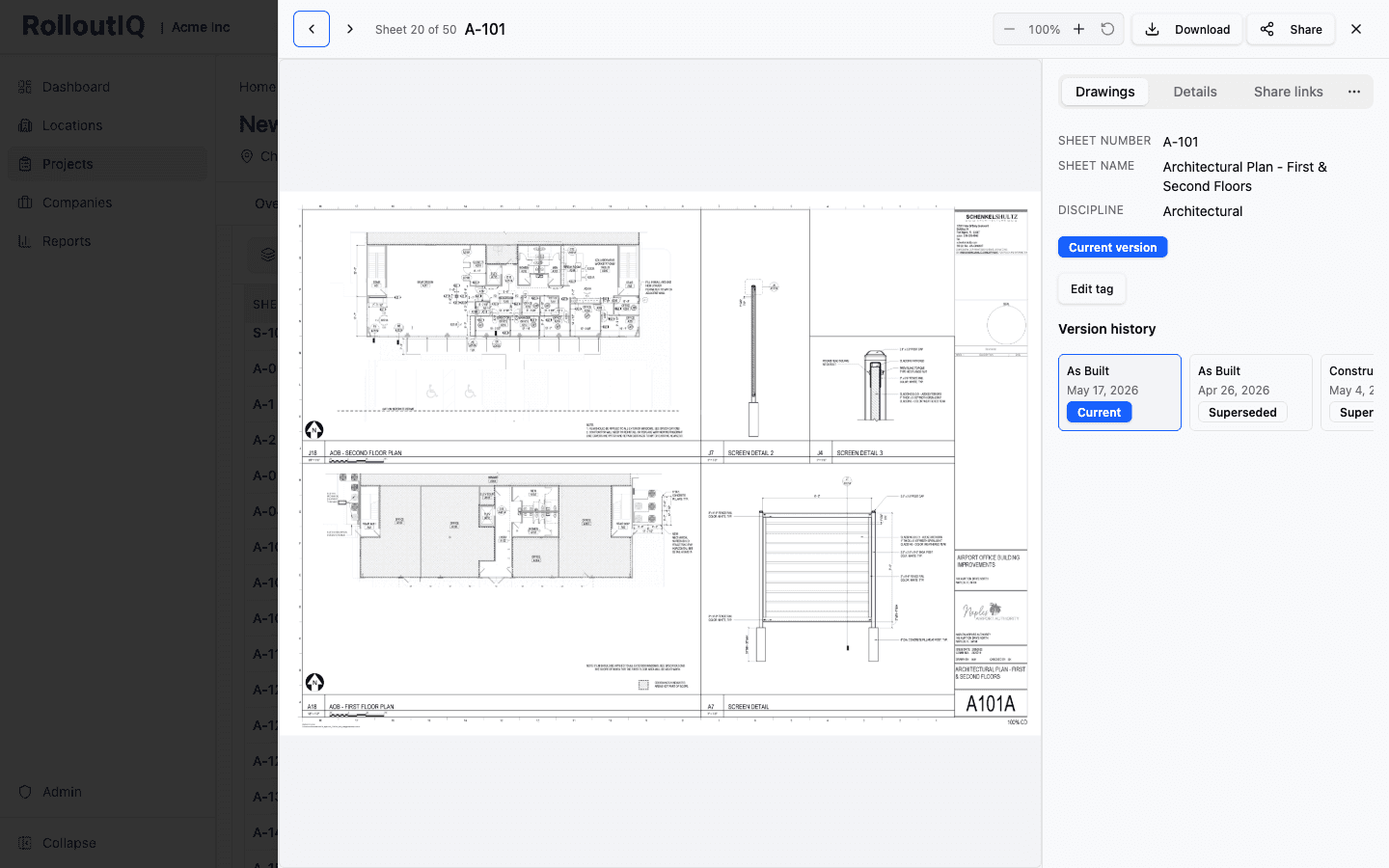
One sheet, its live PDF, and every version behind it
The sheet viewer renders the current PDF inline with its metadata beside it: number, name, discipline, current version, and the full version history. Re-issuances supersede the prior version automatically while keeping it accessible in the timeline, and the whole set compiles to a single PDF in NCS order on demand.
In Practice
How Multisite Teams Use It
Onboard a New Architect Without Chaos
Title-block calibration runs once per set. After the first upload, the platform reads every page against the same region. New architects onboard without weeks of file-naming negotiations.
Eliminate Wrong-Version Drawings in the Field
The Drawings tab always shows the current version of every sheet by sheet number, regardless of which set last issued it. Wrong-version rework drops to near zero.
Compile a Permit Package in a Click
Permit submissions, inspector handoffs, and field-reference packets all need the current state of the set as one PDF. The compile button assembles it in NCS order on demand.
For franchise groups
The approved plan set, kept current
Upload the plan set your franchisor approved for the site. Later revisions supersede their sheets, and the crew always opens the current version of every drawing.
See RolloutIQ for franchise groupsReady to Treat Drawings Like the Structured Object They Are?
See how RolloutIQ™ ingests, versions, and serves drawing sets at the scale multisite retail operators actually run. Book a demo with our team.