
Project Schedule
A Critical-Path Schedule That Actually Stays Current
Retail rollout schedules turn on the opening date. Generic PM tools track dates without real dependencies, and heavyweight CPM tools do the math but sit outside the system of record, so the schedule and the actual work drift apart within weeks. RolloutIQ™ runs the schedule as a first-class layer of the platform that already runs the project.
The Problem
Why Rollout Schedules Drift From Reality
Spreadsheets keep everyone honest for a quarter and then collapse under the weight of 50 stores and 400 deliverables apiece. Heavyweight CPM tools handle the dependency math but require trained schedulers that retail teams do not staff.
Flat Date Lists Lose the Dependency Graph
Spreadsheets and basic PM tools track dates without dependencies. When permit submission slips, every downstream deliverable still shows the original planned date. The published schedule stops matching the work within days of the first slip.
Heavyweight CPM Tools Get Abandoned
Microsoft Project, Primavera, and similar tools handle dependencies but require trained schedulers. Retail PMs build the baseline, then revert to flat lists for day-to-day work. The dependency graph lives in a file no one is maintaining.
The On-Track Signal Is a Manual Status Flag
When project health is set by hand on a weekly call, leadership cannot tell which projects are genuinely slipping and which are just behind on reporting. The portfolio view is only useful if the signal underneath it is computed.
What RolloutIQ™ Does
What RolloutIQ™ Does
Critical-path scheduling, four dependency types with signed lag, live ripple recalculation, and an append-only change log on every save.
Four CPM Dependency Types With Lag
Finish-to-Start, Start-to-Start, Finish-to-Finish, and Start-to-Finish, each with a signed lag or lead in days. That is the dependency graph a real schedule needs, where spreadsheets settle for the Finish-to-Start approximation.
Live Ripple With Inline Preview
Edit a planned date or a dependency and RolloutIQ™ previews every downstream item that would move, and by how many days, before you save. Commit and the engine writes your edit and every downstream shift in a single transaction.
Critical Path With Near-Critical Band
Float is computed per item from the full dependency graph. A near-critical band surfaces deliverables one bad day away from the critical path alongside the truly critical ones, so the team sees what is fragile before it breaks.
Forward and Backward Recalculation
Recalculate forward from any anchor item, or pin the closing milestones to the project's target opening date and pull everything else back to fit. Two answers to the question every rollout PM asks every week.
Cycle Detection on Every Save
If a change would create a circular dependency, the engine refuses the save and shows the exact loop with the most-suspicious edge highlighted, so you fix the dependency you wired wrong instead of chasing the error by hand.
Reason Policy and Append-Only Change Log
Configure when a written reason is required: opening-date shifts, any key milestone, or any planned date. Every save lands in an append-only change log with before-state, after-state, ripple summary, the reason given, and the user who made the edit.
Templates and Curated Deliverables
Apply a tenant-published template (new construction, refresh, relocation, conversion, closure) and the engine inserts every Phase and Deliverable wired to its dependencies. Admins curate Phases, Deliverables, and Schedule Reasons in the Library, so new projects start from the company's playbook rather than a blank canvas.
Target, Planned, and Actual Date Tiers
Every item carries target, planned, and actual dates. Actuals are historical record, not a re-plan trigger: setting an actual start or end does not shift downstream planned dates. A computed On-Track flag turns red when planned dates pass without actuals recorded.
Conflict-Safe Editing
Optimistic locking on every schedule item. When two users edit the same row, the second save sees a clear conflict message instead of silently overwriting the first. The schedule the field is working from matches the schedule the office is editing.
Highlights
Inside the Schedule Tab
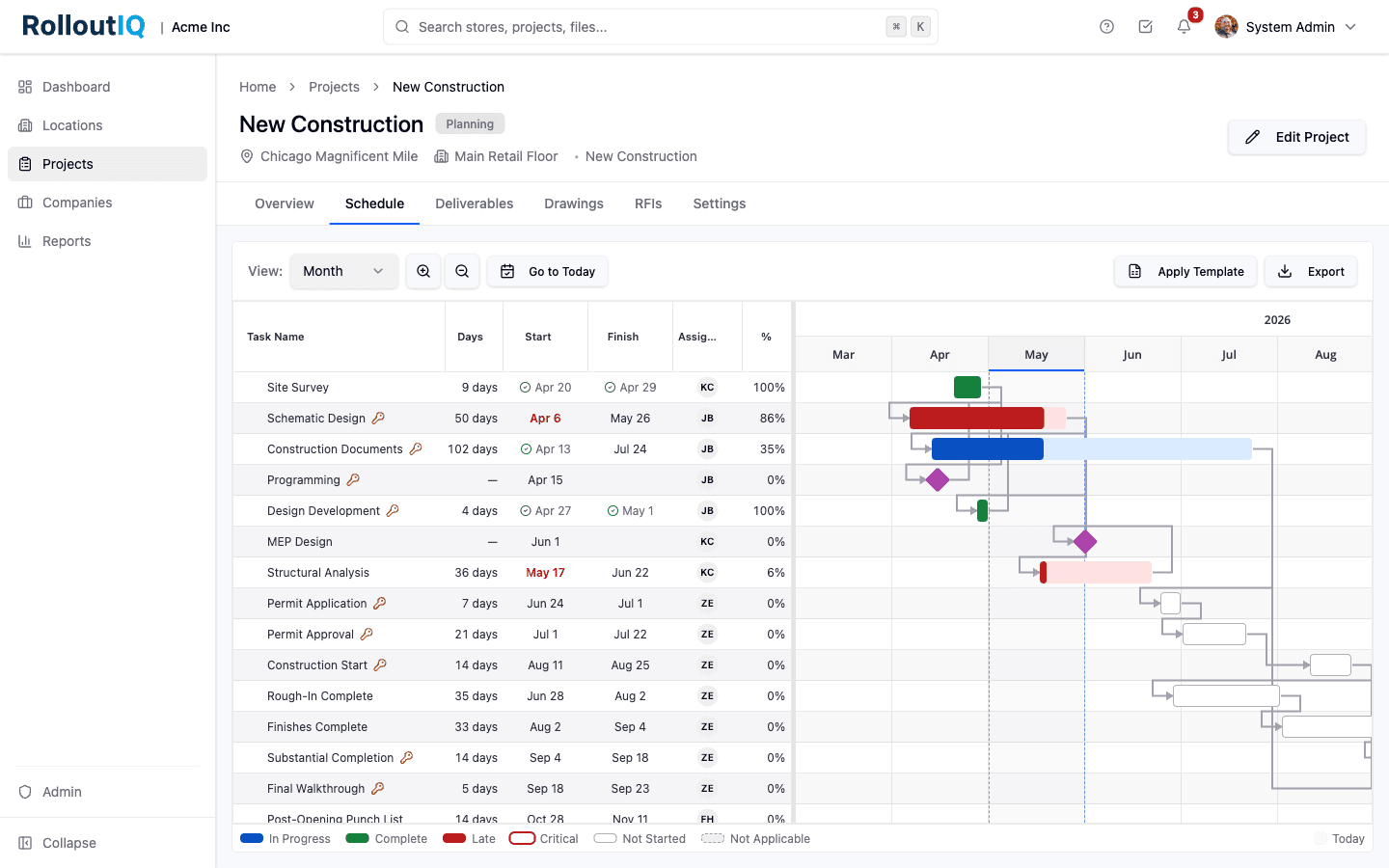
Status coloring, the today line, and every dependency arrow read from the same graph the team edits, so the published schedule and the actual work stay in step.
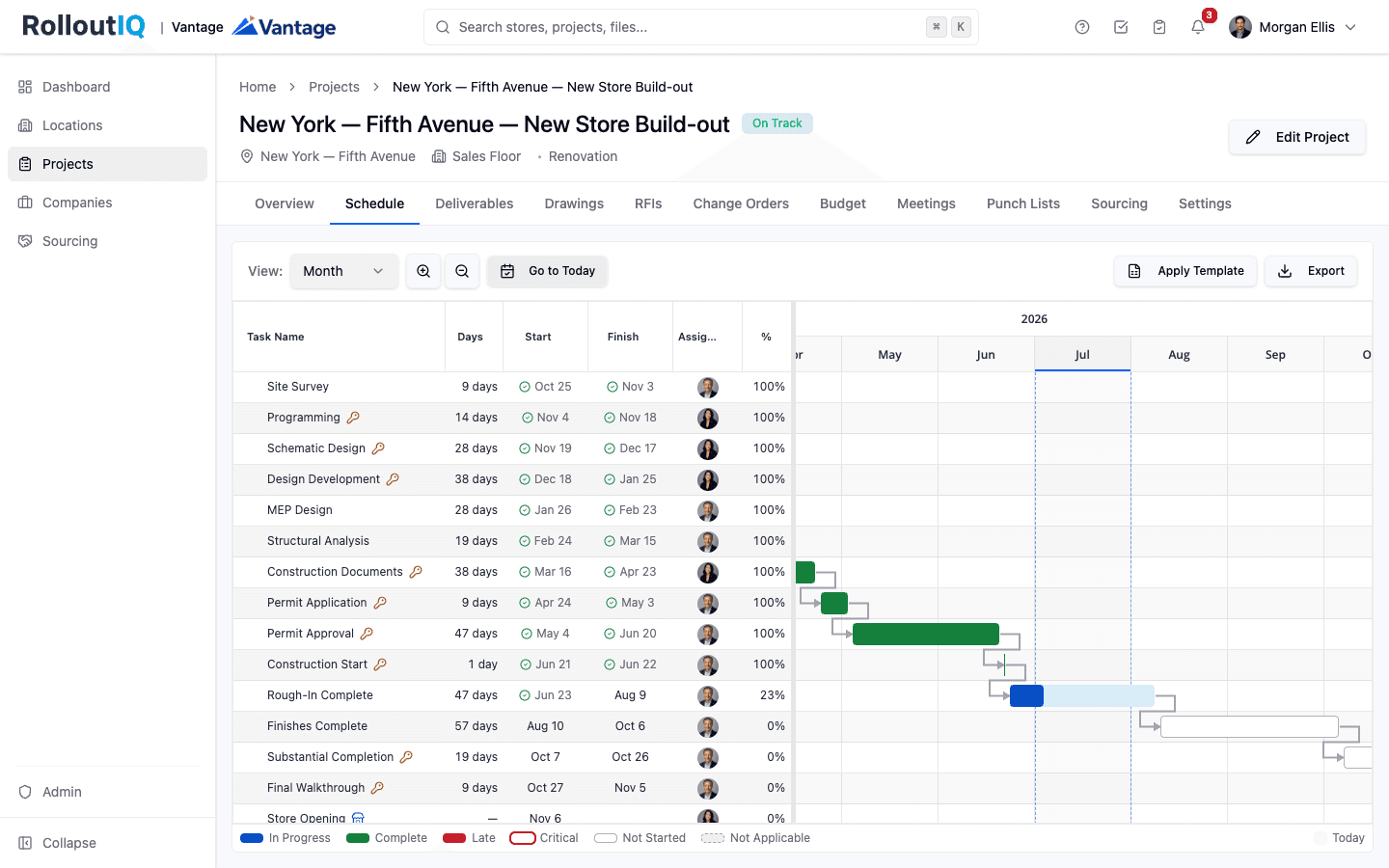
The live schedule, colored by the computed on-track signal
The today line runs through the Gantt, in-progress and completed bars are colored from the computed status, and dependency arrows link every deliverable. Float is computed per item, so the team reads what is critical and what is slipping in the same view they work in, without switching tools.
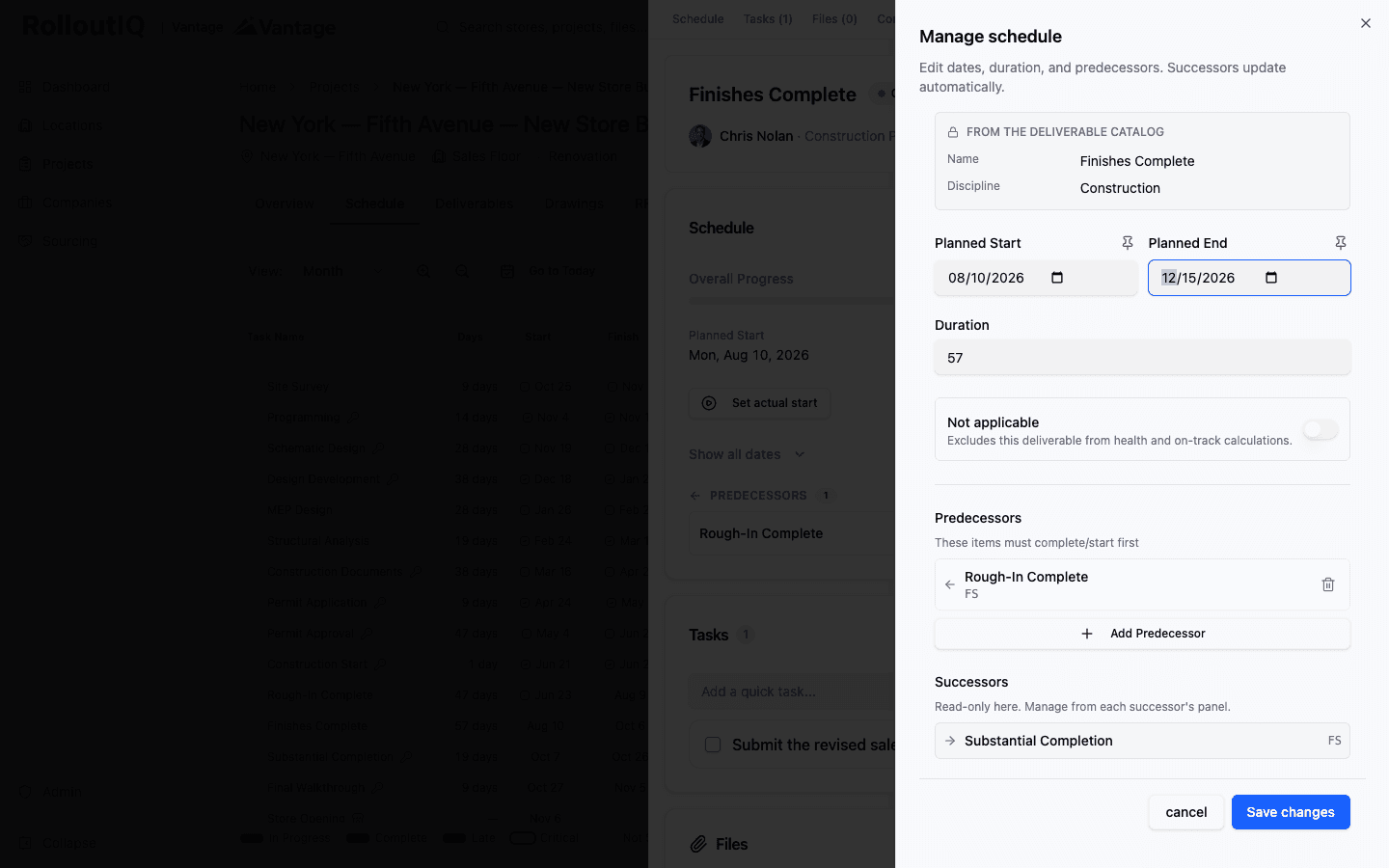
Edit a date and the dependencies do the rest
Open a deliverable to edit its planned dates, duration, and predecessors. Successors update automatically off the dependency graph and the change lands in a single transaction, instead of a manual pass down the list.
In Practice
How Multisite Teams Use It
Replicate Proven Schedules Across Stores
Apply a saved template to each new store and customize from there. The dependencies that hold across every project stay the same; only site-specific adjustments need work.
Defend the Opening Date With Backward Recalc
Pin the grand-opening milestone, recalculate backward, and see which deliverables the schedule needs to compress and by how much. The conversation with leadership becomes which item to move, not whether the date is still defensible.
Answer What Moved Last Week, and Why
The append-only change log records every edit with before-state, after-state, ripple summary, and the reason given, so the weekly review turns into reading the log rather than reconstructing what happened.
For franchise groups
A template for each franchisor's prototype
A group running several brands keeps a prototype template per brand, each with that franchisor's plan sign-off and pre-opening inspection built in as milestones. Tasks owned by a role land on whoever holds that role on the site.
See RolloutIQ for franchise groupsReady to Run Schedules That Stay Current?
See how RolloutIQ™ runs critical-path scheduling at portfolio scale for multisite retail operators. Book a demo with our team.