
Change Orders
Change Order Control Across Every Vendor Stream
On a retail rollout, much of the scope change happens outside the general contractor, in fixtures, technology, signage, and equipment. RolloutIQ™ captures every priced change from every vendor stream, routes it through your approval chain by size, and flows the approved number straight into the budget, with an immutable record of every round.
The Problem
Why Change Order Control Breaks on Rollouts
When most of the change lives outside the GC and the schedule cannot wait, changes get approved fast and tracked loosely. The cost shows up at closeout, and the record that would settle a dispute never existed.
Most of the Change Is Outside the GC
20% to 60% of project cost flows around the general contractor into parallel vendor streams: fixtures, technology and AV, signage, and equipment. Tools that only watch the GC miss it, so the rest of the change is tracked in email and spreadsheets and surfaces at closeout.
Speed Pressure Beats Governance
Retail teams approve changes fast to protect the opening date, because a missed open day usually costs more than the change itself. Without routing sized to the change, urgent work either stalls waiting for a signature or proceeds with no authorization on record.
No Defensible Record of Each Round
When a change lives in an email thread, you cannot show what was originally proposed, what an approver sent back, and what the final priced breakdown was. The version that won is the only one anyone can find.
What RolloutIQ™ Does
What RolloutIQ™ Does
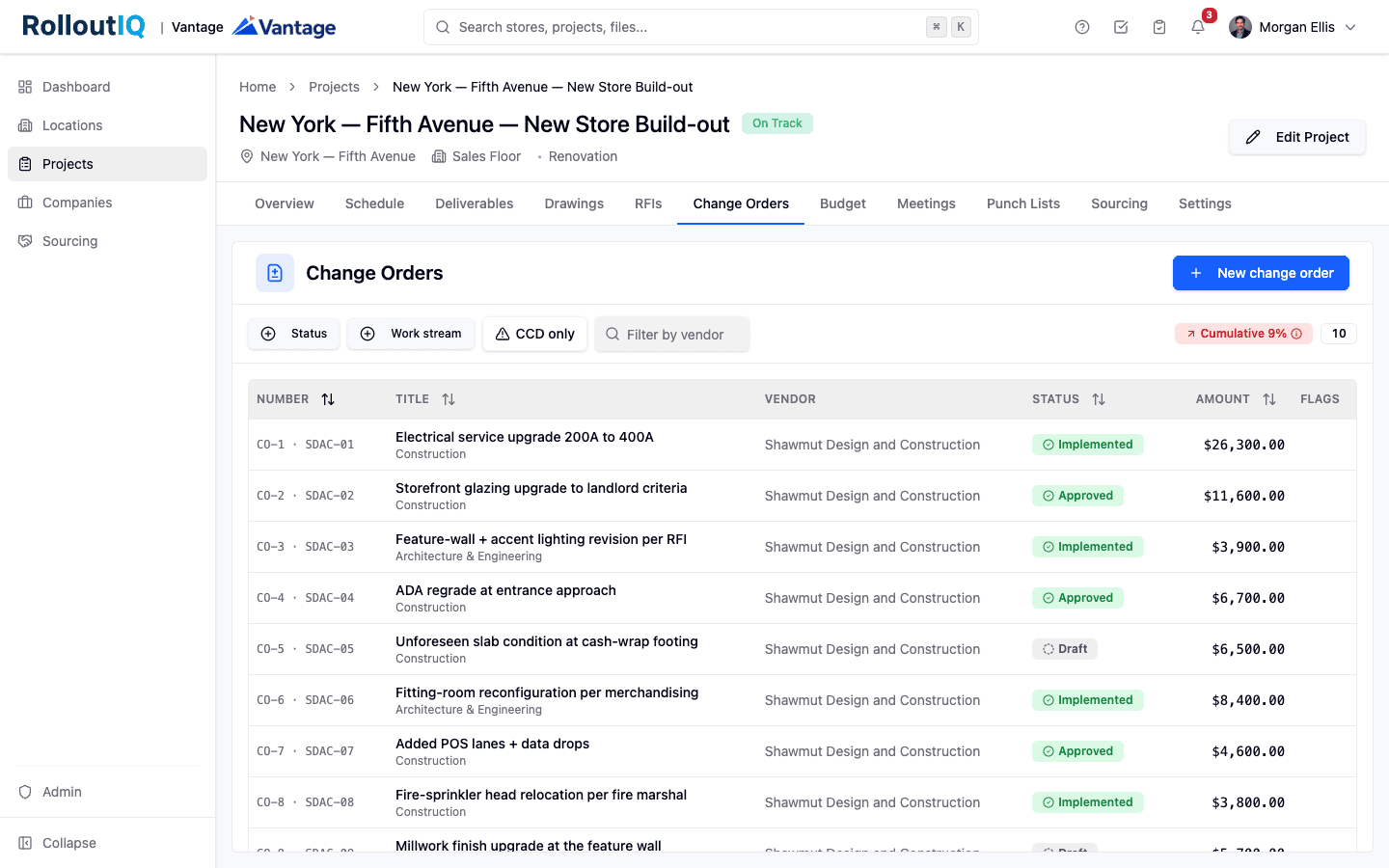
RolloutIQ™ runs change as a structured, priced, auditable workflow across every vendor, from the first submission through the budget revision it opens on approval.
Every Vendor Stream, One Workflow
Capture priced change orders across construction, architecture, fixtures, technology, signage, and equipment, not just the GC. Work-stream-scoped cost categories mean each vendor can only price what is in their scope.
Structured Cost Form
Price the change on a full-screen form, one line per cost category with labor and material amounts or a single lump sum, plus optional overhead-and-profit and sales-tax percentages applied automatically. Attach the backup quote or marked-up drawing to the change.
Approval Routing by Change Size
Route each change through the delegation-of-authority chain sized to its amount, so small changes clear fast and large ones escalate. An optional cumulative trigger adds a sign-off tier once total change on a project crosses your threshold, and the approver records an internal reason that is never shown to the vendor.
A Directive Lane for Urgent Work
Submit a change as a Construction Change Directive on a rough or not-to-exceed basis, so the retailer can authorize work to proceed before the firm price is settled. The final price is submitted later and reconciled against the ceiling, with any overage flagged.
Immutable Per-Round History
Every submission round freezes with its full priced breakdown and that round's backup files. You can always see exactly what was proposed and what an approver rejected, not just the version that was executed.
Straight Into the Budget
Approving a change order can open a matching draft budget revision automatically, linked back to the originating change, so the approved number flows into the cost baseline instead of being re-keyed. A cumulative-change badge tracks the running total of change on the project.
Dual Numbering, Clean on Both Sides
Every change carries a project-wide change-order number plus a private per-vendor number, so a vendor's own list reads one, two, three without gaps, and without ever exposing another vendor's activity.
Highlights
Inside Change Orders
A priced change frozen round by round, and one inbox of every change you can act on across the portfolio.
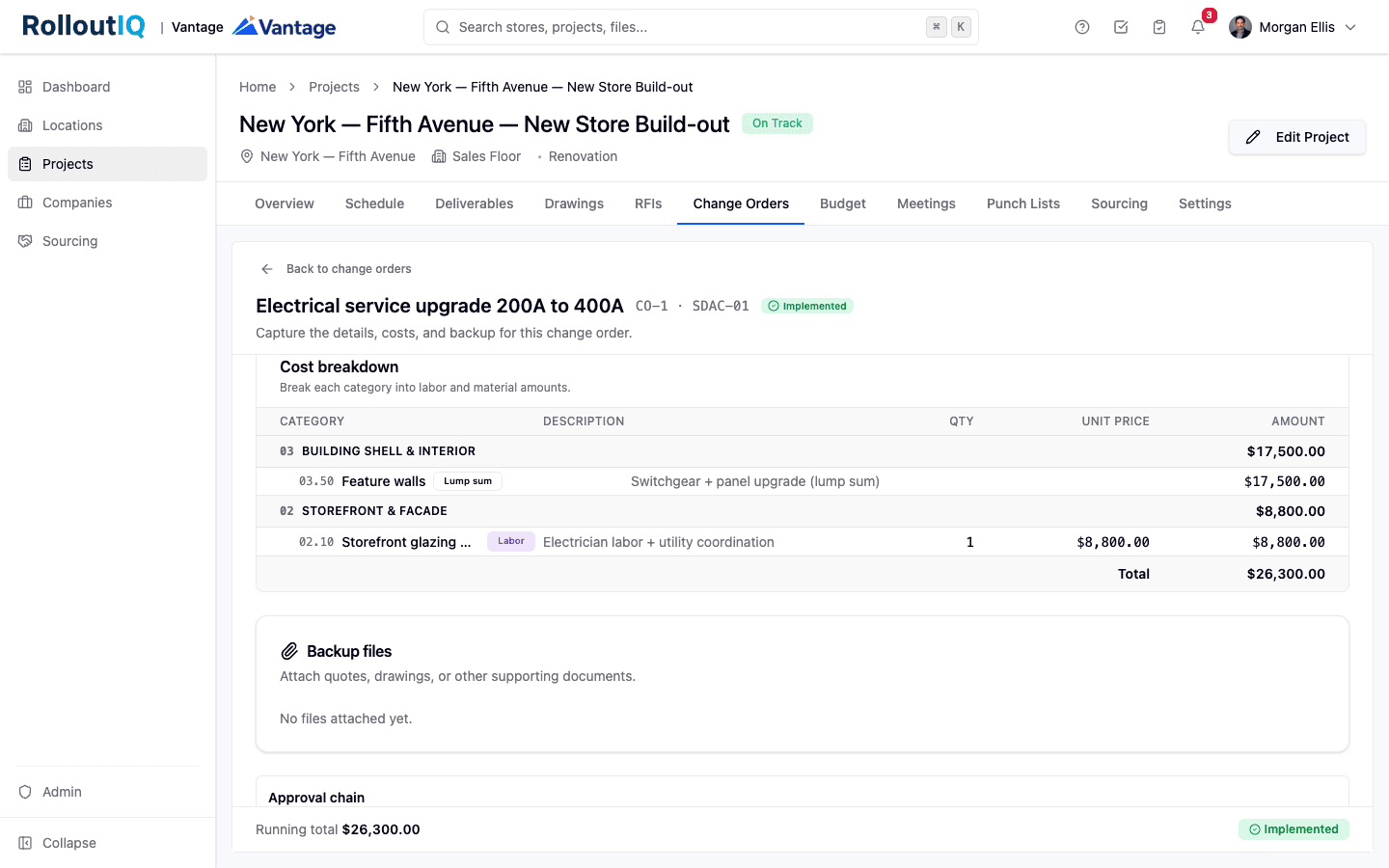
A priced change, structured and on the record
Each change opens on the cost form with its narrative, a breakdown by cost category with labor, material, or lump-sum lines, and the running total. The approval chain sits alongside, and every submission round is frozen with its backup exactly as it stood that round.
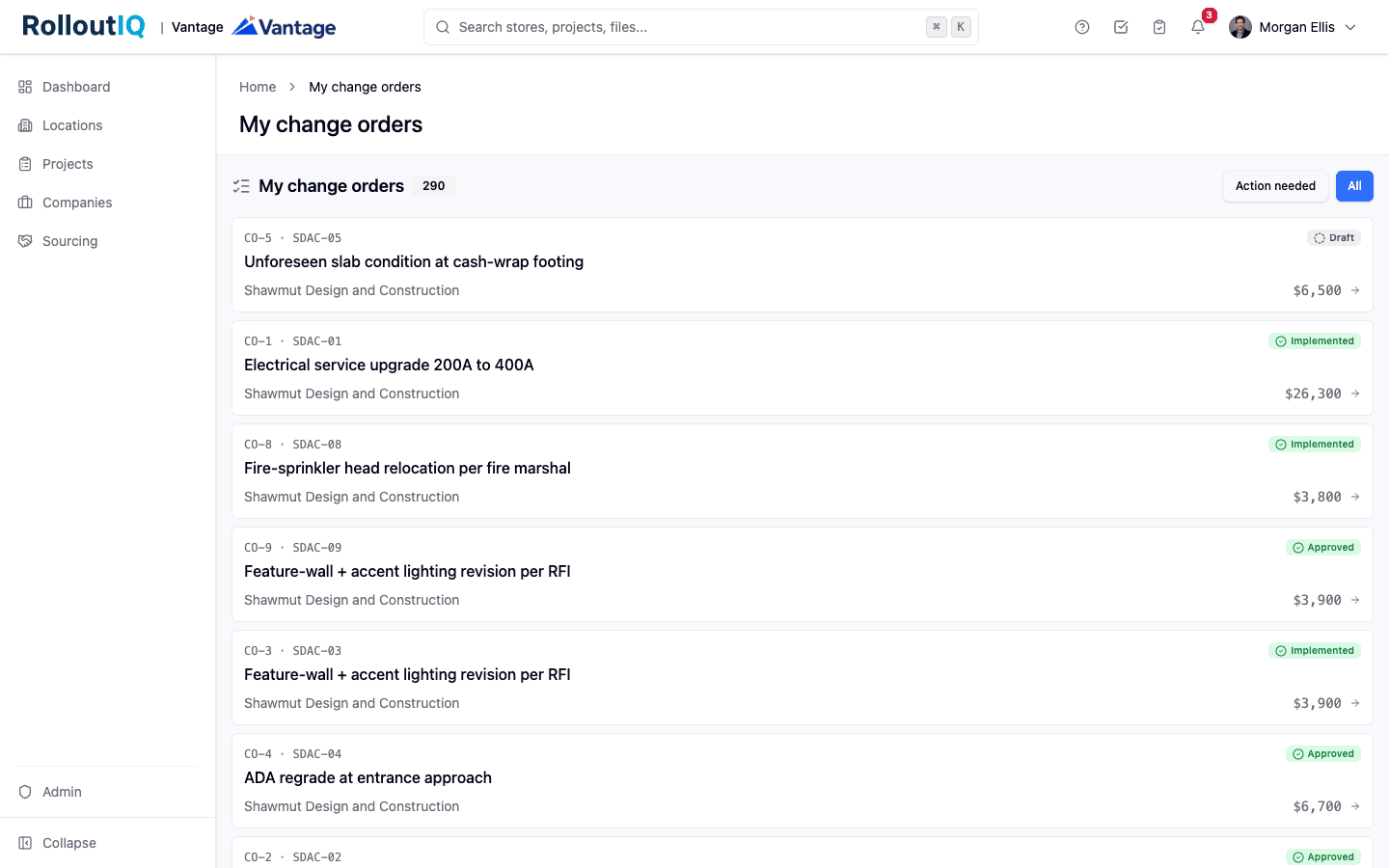
Every change you can act on, across every project
The cross-project inbox pulls every change order you can act on into one queue, filterable to just what needs your action. Dual numbering, vendor, status, and amount read at a glance, so an approver running thirty stores works one list instead of thirty tabs.
In Practice
How Multisite Teams Use It
Catch the Change Outside the GC
The signage and fixture vendors raise their own changes in their own streams, priced against their own cost categories. Nothing gets tracked in a side email and rediscovered as an overrun at closeout.
Authorize Urgent Work Without Losing the Record
A field condition can proceed on a not-to-exceed directive so the schedule keeps moving, while the firm price is priced, submitted, and reconciled against the ceiling, with any overage flagged for review.
Defend the Number With the Full History
When a vendor argues a change was warranted, the frozen per-round record shows what was proposed, what was returned, and what was finally approved, with the priced breakdown behind each round.
For franchise groups
Reimage scope creep, store by store
During a franchisor's reimage wave, every change order is priced and routed before it revises that store's budget. You see how far the program's budgets have moved while crews are still on site.
See RolloutIQ for franchise groupsFAQ
Change Orders FAQ
Change order management software captures a priced scope change on a construction project and routes it through an approval chain to a tracked, auditable outcome. RolloutIQ™ handles change from every vendor stream, not just the general contractor, prices it on a structured cost form, freezes every submission round, and can open a matching budget revision when the change is approved.
Every vendor raises change orders on the projects their company is assigned to, priced against only the cost categories in their work stream. Each change carries a project-wide number plus a private per-vendor number, so a vendor sees a clean list of their own changes without any visibility into another vendor's activity.
Yes. A change can be submitted as a Construction Change Directive on a rough or not-to-exceed basis, so the retailer can authorize the work to proceed before the firm price is settled. The final price is submitted later and reconciled against the ceiling, with any overage flagged.
Approving a change order can open a matching draft budget revision automatically, linked back to the originating change order, so the approved amount flows into the cost baseline instead of being re-keyed. A cumulative-change badge tracks the running total of change on the project.
Ready to Control the Cost of Change?
See how RolloutIQ™ captures priced change from every vendor stream, routes it for approval, and flows it into the budget. Book a demo with our team.