
Meetings
OAC and Coordination Meetings, On the Project Record
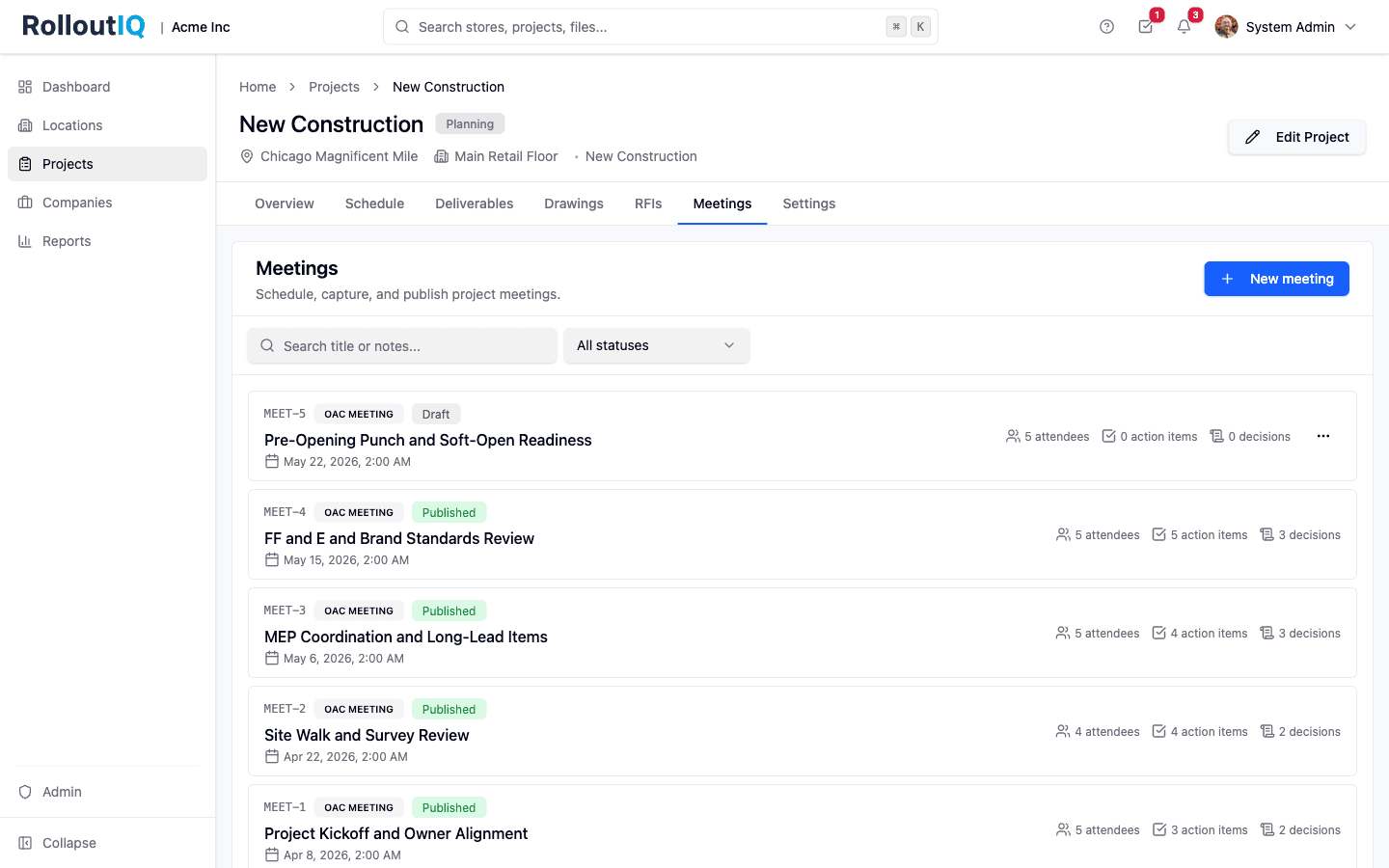
Rollouts run on a recurring cadence of OAC, MEP coord, FF&E, and brand reviews. RolloutIQ™ runs them inside the project, with attendees, structured decisions, action items that flow into Tasks, and a published record that holds up in a change-order dispute. When a project manager rotates off the project a year in, the decision trail is intact.
The Problem
Why Meeting Minutes Become Liabilities
Most teams run their weekly coordination calls out of Word docs, OneNote, and emailed PDFs. The notes live somewhere; the action items live somewhere else; the decisions get re-litigated three months later when no one remembers what was actually agreed.
Minutes Live in Documents Nobody Owns
Word docs and PDFs forwarded as email attachments are the de-facto record on most projects. Three months later, the version in everyone's inbox does not match the version in the PM's folder, and nobody can prove which decision was final.
Action Items Get Reconciled by Hand
Action items captured in a meeting end up in a separate spreadsheet or task tool from the rest of the project's work. Reconciling them against the project plan is a Monday-morning manual exercise that quietly stops happening after week six.
Stalled Items Disappear From Next Week's Agenda
Open action items from last week routinely fail to surface on this week's agenda. The same blocked item drags on for a month because no one remembers to put it back on the list until the day it becomes critical-path.
What RolloutIQ™ Does
What RolloutIQ™ Does
Meetings live on the project as structured records, with attendees, decisions, action items, and a publish-time audit trail.
Per-Project Numbering With Configurable Prefix
Every meeting carries a project-scoped identifier, MEET-1 through MEET-N (your tenant can change the prefix). Two projects can each have their own MEET-1; the label is clean in dispute filings and in cross-team conversation.
Tenant-Curated Types With Agenda Templates
Admins curate the meeting type catalog (OAC, MEP coordination, FF&E, IT deployment, brand and VM review) in the Library, with an optional agenda template per type that pre-fills new meeting notes. Every PM starts from the same playbook.
Attendees Scoped to the Project Team
Inline attendee search shows only people who can already access the project, with each attendee tagged by their project-team role. A per-attendee Attended / Not attended pill keeps the published record honest about who actually showed up.
Rich-Text Notes With Autosave
The notes editor autosaves as you type. After publish, the editor stays open for corrections but every keystroke is captured in the audit log, with a chip on the editor reminding everyone that edits to a published meeting are recorded.
Decisions Log With Supersession
Decisions carry a title, optional rich-text description, and a decided-on date. When a later meeting refines or reverses an earlier decision, you link them bidirectionally so the record reads correctly in either direction. A PM rotating onto the project a year later sees the full decision trail.
Action Items Are First-Class Tasks
Items captured in the meeting's Tasks widget are normal project Tasks with assignee, due date, status, priority, and description. They appear in the assignee's personal inbox and in the project's Tasks views, not in a separate meeting-items system you have to reconcile.
Carryover Surfaces Stalled Items Next Week
Open action items from prior meetings on the same project automatically appear on the next meeting's agenda, with inline triage to complete, cancel, or hide each one. Stalled items get put back in front of the team week after week until they are closed.
Publish Locks the Record and Notifies Everyone
Click Publish and RolloutIQ™ confirms the count of attendees being notified, then stamps the minutes as the official record. Notifications fan out through each user's preferred channel. Subsequent edits remain possible, but every change lands in the audit log.
Files and Comments On the Meeting
Drawings, photos, spec PDFs attach to the meeting through the platform's central file pipeline. A separate comment thread on the meeting keeps off-the-record discussion out of the official notes. Both panels show their live counts on the header.
Highlights
Inside a Published Meeting
The detail page is split: notes on the left, structured widgets on the right. Every published edit is audit-logged, and open items from prior meetings carry over to the agenda automatically.
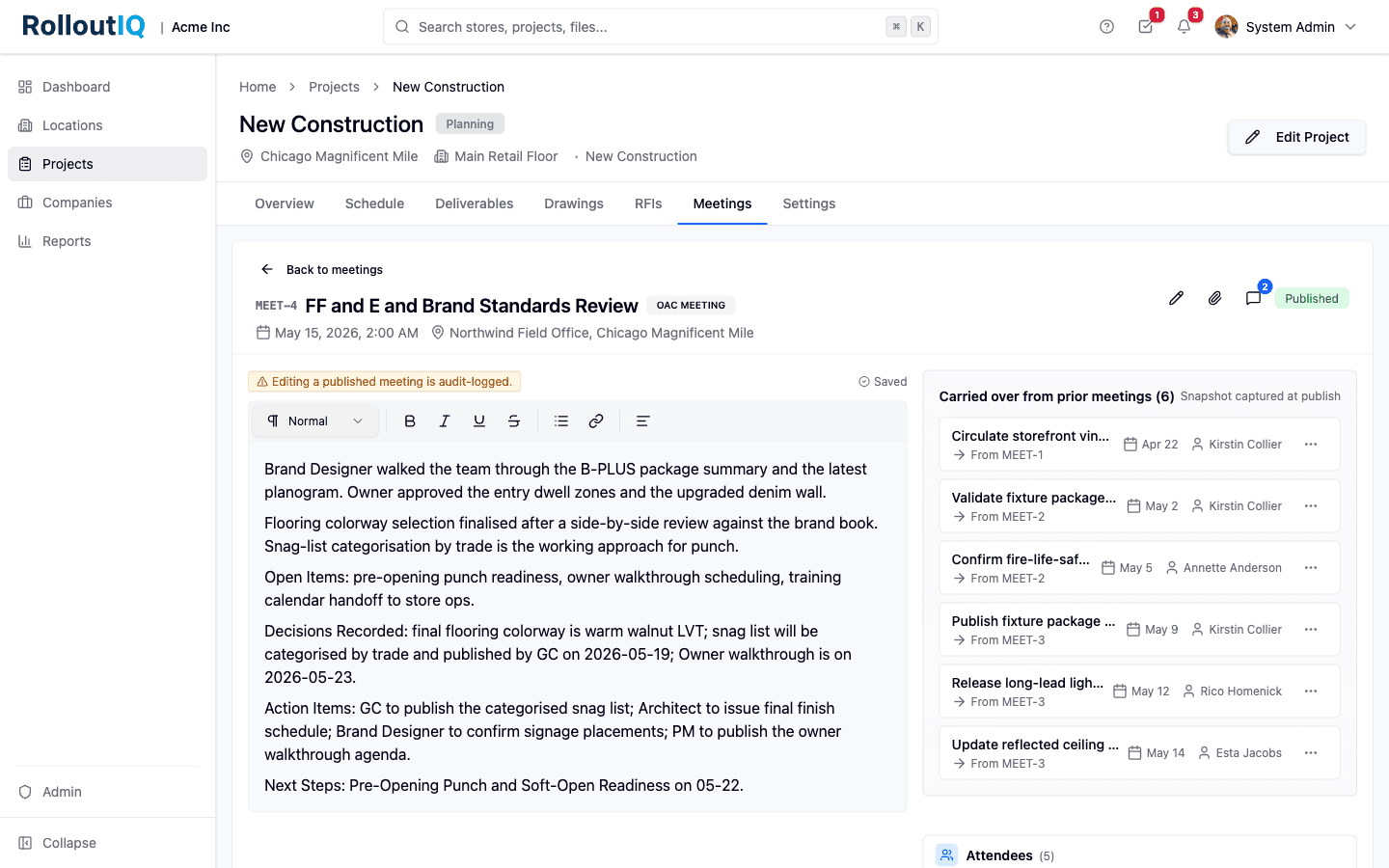
Notes, decisions, action items, and carryover in one surface
The FF&E and Brand Standards Review meeting late in the project, with notes walking through the brand designer's package summary, flooring colorway selection, and snag-list categorization. Decisions are recorded inline as the conversation happens. The Carried over from prior meetings panel surfaces open action items from the earlier OAC meetings so they stay on the agenda until they close. The chip at the top of the editor is the audit-log notice: every edit to a published meeting is recorded.
In Practice
How Multisite Teams Use It
Preserve the Decision Trail Through PM Turnover
When a project manager rotates off a 26-week refresh, the next PM inherits a complete, dated decision trail with supersession links instead of a folder of conflicting Word docs. Onboarding compresses from days to hours.
Stop Losing Items Between Weekly Meetings
The carryover surface puts last week's open action items on this week's agenda automatically. Stalled blockers cannot quietly disappear because someone forgot to copy them forward.
Defend Scope and Change Orders With the Published Record
Every decision lands on a dated, published meeting with attendees and an audit trail of subsequent edits. When a vendor argues a change order is warranted because of a verbal agreement, the meeting record either supports or refutes the claim.
Ready to Run Meetings That Survive the Project?
See how RolloutIQ™ turns weekly coordination calls into structured project records with decisions, action items, and carryover. Book a demo with our team.