
Construction Management
Scheduling a Retail Rollout Is a Team Sport
A retail rollout schedule coordinates dozens of people, most of them outside your company. The schedule works best when the whole team can see and update it together. Here is the case for one shared, role-scoped schedule instead of a master file only one person can open.
The Schedule Everyone Depends On, That Almost Nobody Can Open
A single retail store opening pulls on dozens of parties. The owner's project manager, the general contractor, the architect, the MEP engineers, the permit expediter, the fixture and signage vendors, the IT and low-voltage installers, and the regional construction manager watching from above. Every one of them makes decisions against the same thing, the schedule that runs from letter of intent to grand opening across roughly 35 milestones.
Now look at where that schedule actually lives. In most programs it is a Microsoft Project or Primavera P6 file on the scheduler's laptop, or behind a handful of expensive licenses the field and the partners never get. The schedule that the whole team depends on is editable by exactly one person.
Everyone else works off an export. A PDF emailed last Tuesday, a screenshot pasted into the OAC deck, a printout pinned in the trailer. Within days there are five versions in circulation and no reliable way to know which one is current. The people doing the work that actually drives the critical path, the GC and the trades and the long-lead vendors, are the ones furthest from the live plan. That is the gap where opening dates quietly slip.
Why the Master-File Model Breaks at Multisite Scale
Tools like Microsoft Project and P6 do the dependency math well. They were built as single-author desktop tools, though, and that assumption is what fails a multisite program.
Licenses are scarce and costly, so access concentrates on one or two schedulers. The general contractor, the architect, and the vendors who own most of the milestones either never get in or get a read-only export that is stale the moment it is sent. Because they cannot update the plan, the updates that matter, an inspection that passed, a delivery that slipped, a rough-in that finished early, reach the schedule late or by email, if at all. The master file and the job site drift apart, and the drift is invisible until someone reconciles it by hand.
The spreadsheet alternative is no better here. It is more shareable, but it has no concept of a dependency, no record of who changed what, and no way to stop two people from saving conflicting versions. At fifty stores and four hundred deliverables apiece, hand-reconciling versions is not a process, it is a full-time job that no one is actually doing.
None of this is a knock on the math inside those tools. It is that a plan dozens of people must act on cannot live somewhere only one person can reach.
What Collaborative Scheduling Looks Like
The fix is not a better file. It is treating the schedule as one shared system of record the whole team reads and writes, with access scoped by role rather than by who owns a license.
Internal staff and external partners work the same schedule, not their own copies. An architect, a general contractor, or a signage vendor sees and updates the deliverables on the projects they are assigned to, scoped by their company role, so a vendor never sees what a vendor should not while still keeping their own dates live. The people doing the work maintain the plan, which is the only way it stays true.
Because everyone is on one live schedule, an edit recalculates for all of them at once, and the downstream shifts are the same for the PM, the GC, and the executive sponsor. When two people edit the same row at the same time, the second one gets a clear conflict message instead of silently overwriting the first. The discussion and the documents live on the schedule item itself, so the reason a date moved travels with the date rather than getting buried in an inbox. And the people who only need to watch, sponsors and regional leaders, read the live schedule directly instead of waiting for someone to export it.
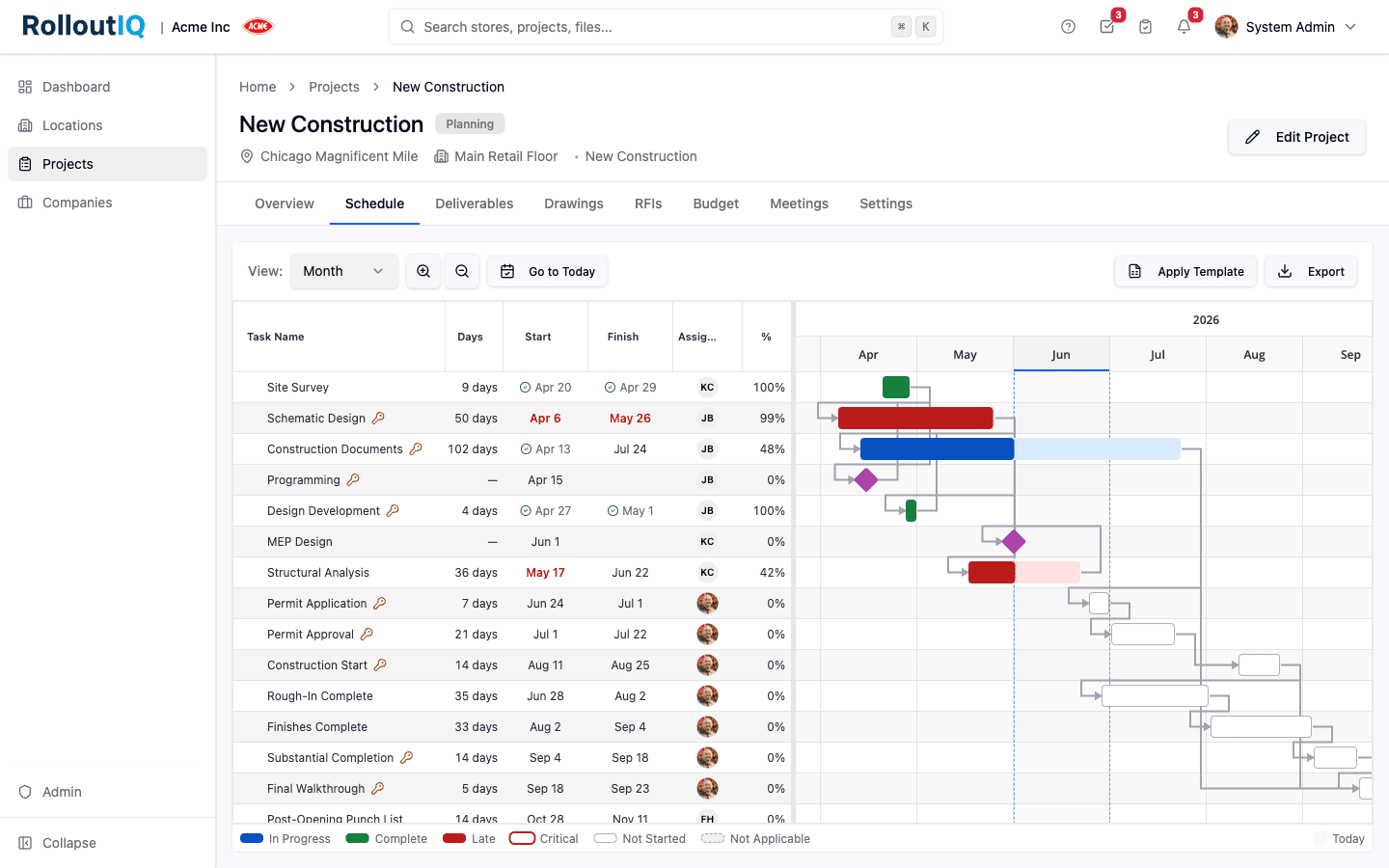
This is the model RolloutIQ™ builds the project schedule on, a single role-scoped schedule that internal teams and outside partners work together as a first-class layer of the platform that already runs the project. The point is not the specific product. The point is that one shared schedule, not a master file plus a pile of exports, is the only structure that survives a portfolio.
What This Looks Like in Practice
A general contractor finishes MEP rough-in on the store they are assigned to and marks it complete on the schedule directly. The regional construction manager sees the result the same minute, not in next week's PDF, and because the dependency graph is shared and live, anyone looking at that project sees the same downstream picture.
An executive sponsor pulls the live schedule to confirm a grand opening date is still defensible, reads it themselves, and never has to ping the PM for a current export. A signage vendor opens the same project and sees only the fields their role allows, updates their install dates, and leaves a comment on the deliverable explaining a two-day shift, where the PM will actually see it.
One schedule. Many people, inside and outside the company, each working the part they own, all looking at the same version. Nobody is maintaining a private copy, and nobody is acting on a plan that was already three versions out of date.
What Operators Should Take Away
A schedule's value scales with how many of the right people can see and trust it. When you evaluate how your program schedules a portfolio of openings, the questions that matter are about access and shared truth, not just the dependency math.
- Every stakeholder, including external partners, works the same schedule rather than their own exported copy
- Access is scoped by role, so partners update what they own without seeing what they should not, instead of all-or-nothing licensing
- An edit recalculates live for everyone at once, so there is one downstream picture, not one per copy
- Simultaneous edits to the same item produce a clear conflict, not a silent overwrite
- The reason a date moved lives on the schedule item, in comments and a change log, not in someone's inbox
- View-only roles like sponsors and regional leaders read the live schedule without needing a license or an export
- The schedule is the system of record the work is done against, not a master file that gets exported and emailed
The Bottom Line
A master schedule on one person's laptop optimizes for the scheduler and starves everyone else. It looks controlled and is actually fragile, because the moment it is exported it starts drifting from the job. A retail rollout is a team sport played mostly by people outside your company, and the schedule they coordinate around has to be something they can all open, trust, and update. One shared, role-scoped schedule is not a convenience. At fifty stores, it is the only way the whole team is ever looking at the same plan.
The Rollout
The Rollout, in your inbox
A founder's read on retail and multi-site store development. What the latest news means for your pipeline, and what we are building, every couple of weeks.

Written by
Nariman Shariat
Founder, RolloutIQ
Nariman has spent about 20 years opening stores, in the seat between the landlord, the architect, and the general contractor, across some of the largest retail and workplace fleets in the country. Along the way he built the internal platform that ran store development across a fleet, then rebuilt the same idea company after company. He founded RolloutIQ to give multi-site development teams the single source of truth he kept having to build by hand, and writes here about the work of opening and remodeling stores at scale.
More about NarimanKeep Reading
Related Articles
Continue exploring best practices for store development and construction management.

When One Date Slips, Everything Else Should Shift: Schedule Editing at Multisite Scale
Most schedule tools let you change a date but won't shift the dependent items. The result is a schedule that drifts from reality the day after it's published. Here's how schedule editing should work at multisite scale.

Construction Schedule Float and How Multisite Operators Should Use It
Schedule float is one of the most useful and most misused concepts in construction management. Here is how multisite operators should think about it.

The Complete Guide to Multi-Site Construction Management
Managing construction across multiple sites simultaneously requires a fundamentally different approach than single-project management. Here is your complete guide.
Ready to Build Smarter?
See how RolloutIQ™ can streamline your retail and multi-site rollout program. Book a personalized demo with our team.