
Construction Management
Managing Change Orders Across Every Vendor Stream
The change that blows a retail budget is rarely the general contractor's. It is the fixture, technology, signage, and equipment change that no one is tracking until closeout. Here is what change order control has to do to catch it.
Most of the Change Is Not the GC's
Ask a retail construction team where their cost overruns come from and the honest answer is rarely the general contractor's contract. On a store rollout, a large share of project cost, commonly put in the range of twenty to sixty percent, flows around the GC into parallel vendor streams. Fixtures, technology and audiovisual, signage, equipment, and FF&E are often contracted directly by the retailer, outside the GC's prime contract entirely.
Those streams generate change just like the construction does. A fixture package changes when merchandising revises the layout. A signage order changes when the landlord's criteria come back different. An equipment spec changes when the utility service turns out undersized. But most change order tools were built to watch one thing, the GC's prime contract and the subcontracts beneath it. Everything else gets tracked in email threads and side spreadsheets, and it stays invisible until the numbers are reconciled at closeout.
The result is predictable. Closeout actuals routinely run several percentage points over the sanctioned budget, and the gap concentrates in exactly the off-construction streams nobody was formally tracking. Industry benchmarks put total change on a project at roughly ten percent of contract value on a healthy job and closer to a quarter on a distressed one. AIA Contracts, in a 2023 study called The Truth About Change Orders that mined its own database of construction contracts, set out to quantify how often change orders occur and where in a project's life they arise. And the cost of getting change wrong is not small. A landmark study by the software firm PlanGrid and the consultancy FMI put the annual cost of rework and other non-optimal work on US construction at roughly $177 billion, and traced nearly half of that rework to poor communication and inaccessible project data. That is the exact failure mode of change tracked across email threads and side spreadsheets, and it is where the projects that blow through the benchmark usually come apart.

Why Change Order Tools Miss Half the Change
The tools most retail teams inherit come from general construction, and they model the world the way a general contractor sees it. There is a prime contract, there are subcontracts beneath it, and change flows down that tree. That model is genuinely good at what it covers. The problem is that it does not cover the retailer's direct contracts with the signage, fixture, and technology vendors, which sit in a different tree the GC never touches.
So those changes fall back to spreadsheets, and spreadsheets bring their own failures. Nothing routes a small change differently from a large one, so either everything waits for the same senior signature or nothing gets real scrutiny. Nothing stops the person who raised a change from also approving it. There is no safe way to share a change log with a direct vendor, because sharing the file exposes every other vendor's pricing on it. And when a change is finally approved, the number gets re-keyed into the budget by hand, which is one more place for it to drift.
The speed pressure unique to retail makes all of this worse. A missed opening day usually costs a store more in lost sales than the change order in dispute, so retail teams are structurally biased to approve fast and protect the date. That instinct is correct. It only becomes dangerous when there is no structure underneath it, when approving fast means approving without a record, a routing rule, or a running total of how much change the project has already absorbed.
What Change Order Control Should Do
A change order system built for retail has to start from a different premise. Every priced change belongs in one workflow, whether it originates with the GC, the architect, or a direct fixture, technology, or signage vendor. Each vendor prices against only the cost categories in their own work stream, so a signage vendor cannot price structural work and a construction change reads in construction terms.
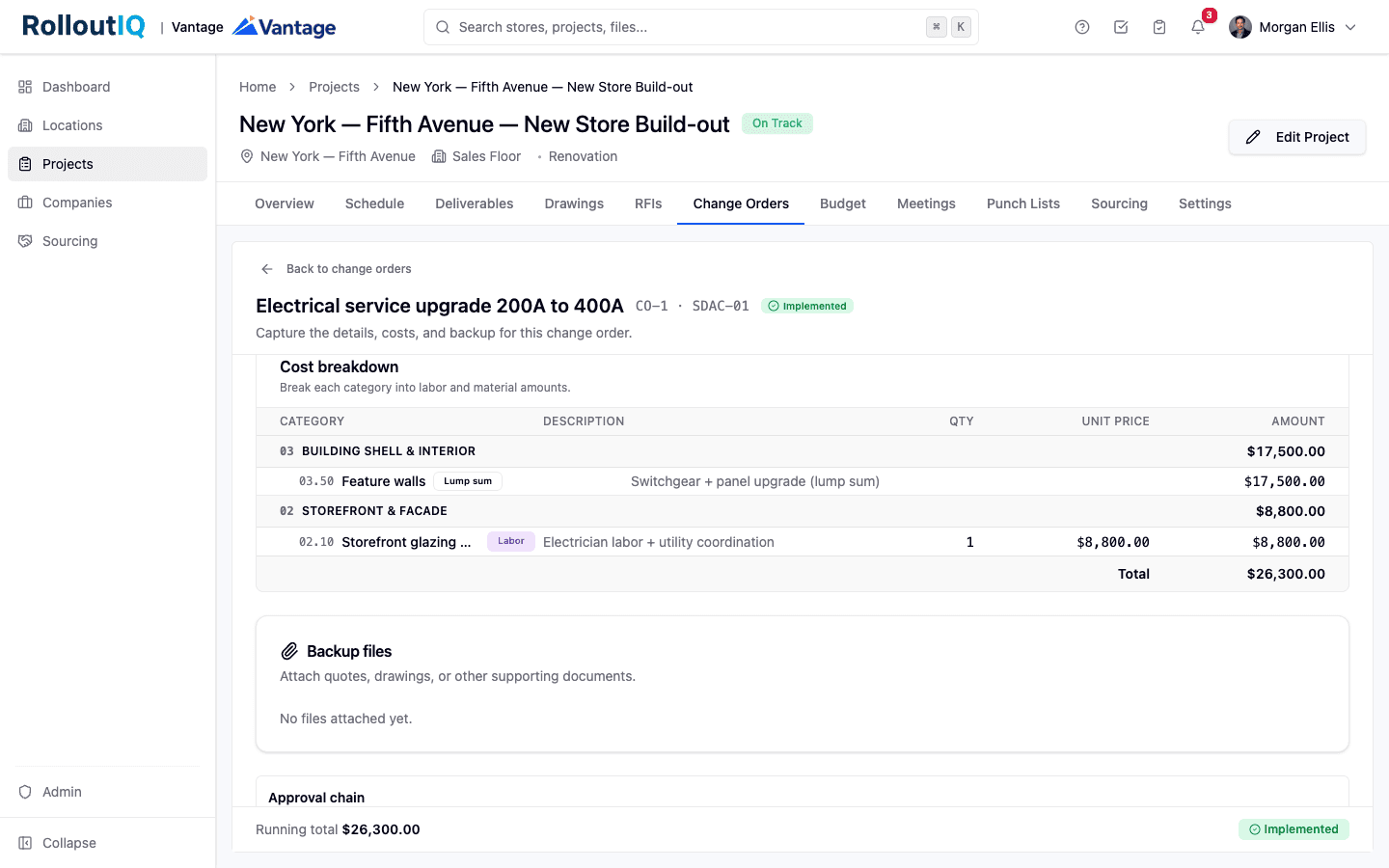
The pricing itself needs structure, not a number in an email. A change should be captured on a form with a line per cost category, labor and material or a lump sum, with overhead, profit, and tax applied consistently, and the backup quote or marked-up drawing attached to the change itself.
Control then has to match the size of the change. Small changes should route quickly and large ones should escalate, through an approval chain sized to the amount, with the person who raised the change unable to sign it off. On top of the per-change routing, a cumulative trigger should escalate approvals once the running total of change on a project crosses a threshold, because the tenth small change that pushes a job past a limit deserves scrutiny the first nine did not trigger on their own. This is the model RolloutIQ™ builds change order management on, one workflow that captures priced change from every vendor stream and routes it by size.
One Record, From the Change to the Budget
The value of putting every change in one place shows up in three ways a spreadsheet cannot match. First, every submission round is frozen. When a change is returned for revision and resubmitted, the earlier round is preserved exactly as it stood, so you can always see what was originally proposed and what an approver rejected, not just the version that won. That record is what settles a dispute months later.
Second, the approved number flows into the budget instead of being re-keyed. Approving a change can open a matching draft budget revision automatically, linked back to the change that caused it, so the cost baseline and the change log never drift apart. A cumulative-change badge tracks the running total of change on the project, so the burn is visible while there is still time to act on it, not discovered at closeout.
Third, the numbering stays clean on both sides. Each change carries a project-wide number for the retailer and a private per-vendor number for the vendor, so a vendor's own list reads one, two, three without gaps and without ever seeing another vendor's activity on the same store.
How It Works on a Live Store
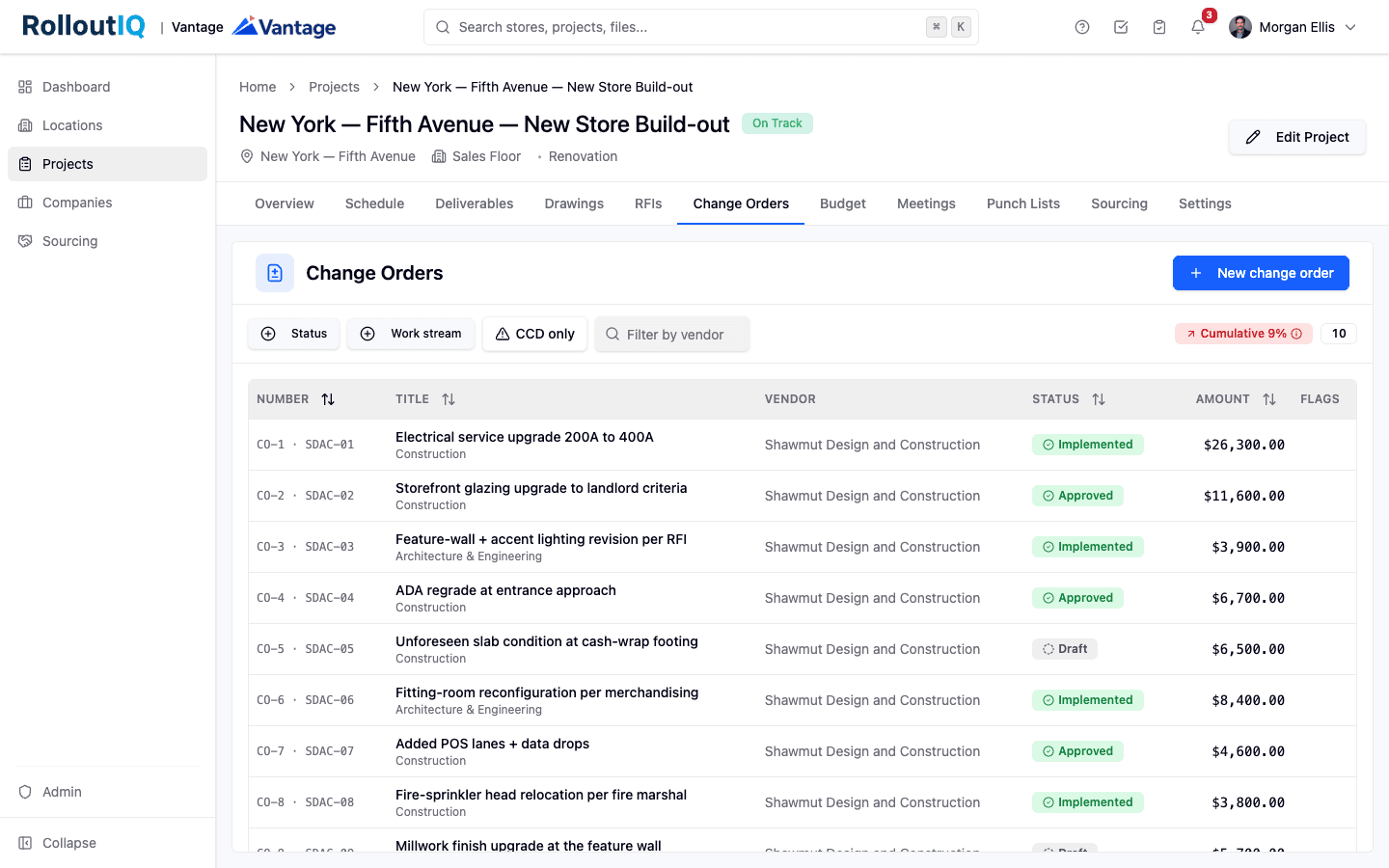
Picture the workflow on a single store. The general contractor hits an unforeseen slab condition at the cash-wrap footing. They open the project's change orders, price the added work by cost category, attach the backup, and submit. Because the amount falls in a mid tier, it routes to the regional finance lead rather than waiting on a senior signature, and on approval a draft budget revision opens against it automatically.
On the same store, the signage vendor raises a separate change when the landlord's criteria come back different. It lives in its own work stream, numbered independently, and the signage vendor never sees the GC's change or its pricing. When a field condition cannot wait for a firm price, the vendor submits the work as a directive on a not-to-exceed basis, the retailer authorizes the work to proceed against that ceiling, and the final price is submitted and reconciled against it later, with any overage flagged.
And the person who has to keep all of this straight, a construction manager running thirty stores at once, does not open thirty tabs. Every change they can act on lands in one cross-project inbox, filtered to just what needs their attention, so approvals happen in one queue instead of a scavenger hunt across projects.
What to Look For in Change Order Control
Only about 2.5 percent of construction firms report that their projects consistently finish on time and on budget, according to FMI's 2025 project management study. Change control is one of the disciplines that separates that small group from everyone else. Whatever tool a multisite team uses, the same questions separate change order control that holds a budget from a system that only records the change after the money is already gone. Before the next rollout, it is worth pressure-testing the workflow against a short list.
- Does it capture priced change from every vendor stream, or only the general contractor's contract?
- Is approval routed by the size of the change, with a cumulative trigger once total change crosses a threshold?
- Can the person who raised a change be blocked from approving their own?
- Can urgent work start on a not-to-exceed directive without losing the record?
- Is every submission round preserved, or only the version that was executed?
- Does an approved change flow into the budget automatically, or get re-keyed by hand?
- Can you share a change with one direct vendor without exposing the others?
Sources
The benchmarks cited in this article come from the following industry research.
- AIA Contracts (powered by Catina), The Truth About Change Orders (2023) - https://learn.aiacontracts.com/articles/the-truth-about-change-orders/
- PlanGrid and FMI, research on the cost of construction rework and non-optimal activity, reported by Construction Dive - https://www.constructiondive.com/news/industry-could-be-overspending-177b-per-year-study-finds/529450/
- FMI Corporation, 2025 Project Management Study (Why Project Management Still Fails) - https://fmicorp.com/insights/thought-leadership/2025-project-management-study-part-1
The Rollout
The Rollout, in your inbox
A founder's read on retail and multi-site store development. What the latest news means for your pipeline, and what we are building, every couple of weeks.

Written by
Nariman Shariat
Founder, RolloutIQ
Nariman has spent about 20 years opening stores, in the seat between the landlord, the architect, and the general contractor, across some of the largest retail and workplace fleets in the country. Along the way he built the internal platform that ran store development across a fleet, then rebuilt the same idea company after company. He founded RolloutIQ to give multi-site development teams the single source of truth he kept having to build by hand, and writes here about the work of opening and remodeling stores at scale.
More about NarimanKeep Reading
Related Articles
Continue exploring best practices for store development and construction management.

A Store Rollout Budget Should Be a Governed Baseline
The budget for a store project covers six cost families, not just construction, and the hard part of all of it is governance rather than arithmetic. Here is what it means to run the whole project budget as a baseline.
Bid Leveling: Where Your Real Construction Cost Is Decided
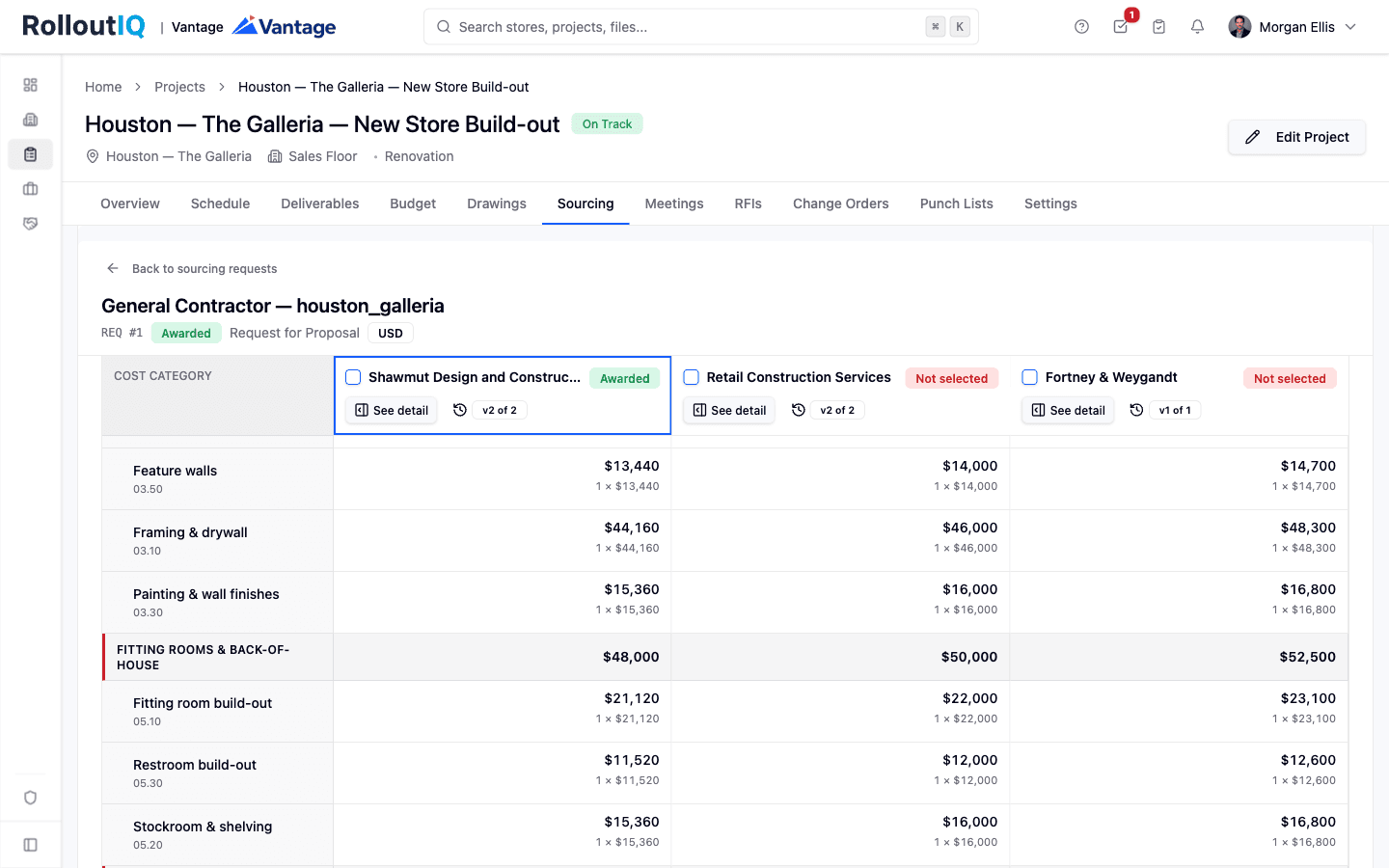
The lowest bid is rarely the lowest cost. Bid leveling, the work of making competing bids comparable, can eat 40 to 80 hours a project. Here is how multisite teams make competitive bidding fast, fair, and auditable.
Ready to Build Smarter?
See how RolloutIQ™ can streamline your retail and multi-site rollout program. Book a personalized demo with our team.